Promptions improves prompting with ephemeral UI
Video
Why prompting AI is hard
Prompting an AI looks simple, but getting the response you want often takes careful prompt engineering. It is hard to learn, because it is not always obvious what context the AI needs. It is also tedious to write, because crafting the right prompt takes time.
“I have to do so much [work] around my prompt to give it the context to make it specific, point it to the tone to do, and a lot of times I’m repeating … those same things. I felt like [this] would really help me shortcut what I’m doing manually today.”
If You’re Building UI for AI, Give Users the Power of Choice
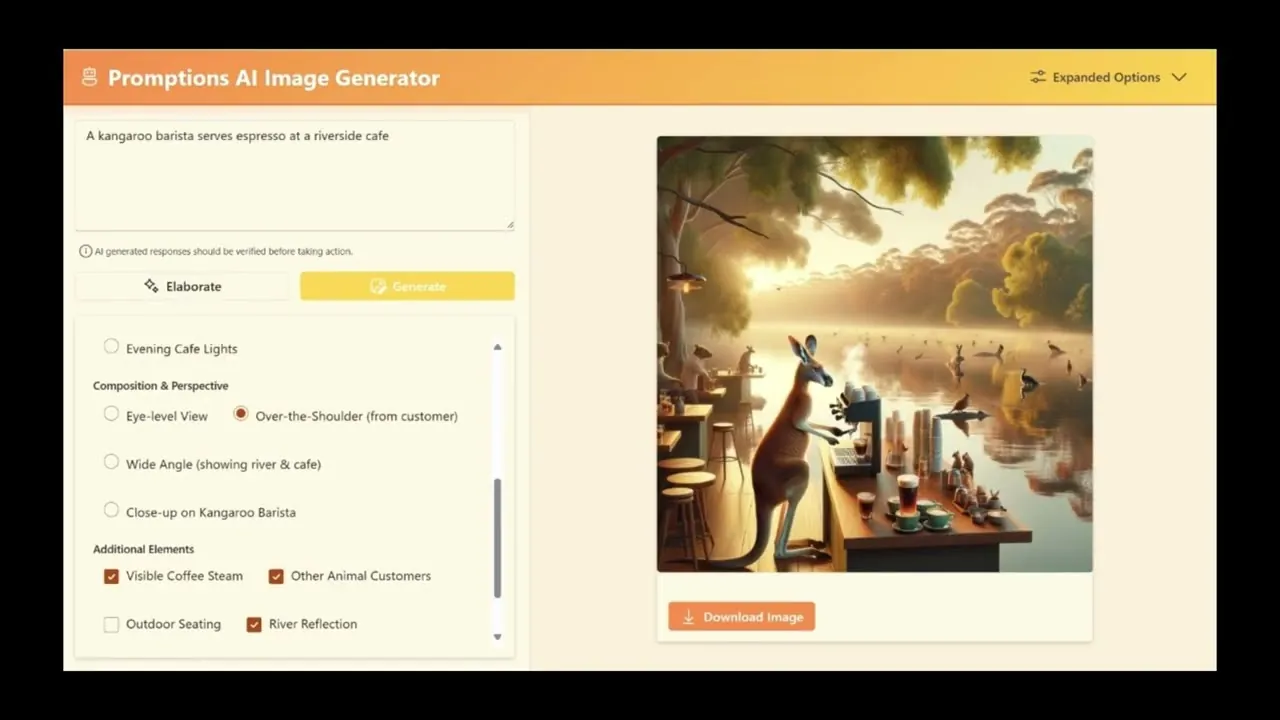
Promptions (“prompt” plus “options”) generates controls for each request, such as radio buttons, checkboxes, and toggles. When a user changes a control, Promptions updates the AI’s response straight away, so they can steer it without rewriting the prompt.
This is an example of “ephemeral UI”: an emerging approach in which AI creates interface elements on the fly, and they last only as long as they are needed.
What Promptions can do
Promptions suits any interface where adding context to a prompt can steer the AI toward what the user prefers, without the user having to write or say that context.
| Domain | Description |
|---|---|
| Customer support chatbots | Users refine support queries on the fly (e.g., specify tone or detail level) and see updated answers instantly, improving resolution speed and satisfaction. |
| Content creation platforms | Writers and marketers tweak style, length, or format parameters through GUI controls, iterating drafts faster while maintaining creative direction. |
| Data analytics and BI dashboards | Analysts adjust filters, aggregation levels, or visualization styles via checkboxes and sliders, regenerating AI-driven reports and insights instantly. |
| Educational tutoring systems | Students select difficulty, focus topics, or feedback style, prompting the AI tutor to adapt explanations and examples to individual learning needs. |
| Healthcare decision-support tools | Clinicians refine symptom context, risk factors, or treatment priorities through guided options, obtaining tailored diagnostic suggestions and care pathways. |
| Data annotation and curation | Promptions can parameterize labeling decisions into structured GUI inputs (e.g. sentiment sliders, style toggles), improving consistency, speed, and auditability in dataset creation. |
| Interactive explainability & auditing | Promptions allows users to explore how AI outputs shift with different refinement choices, offering a lightweight way to probe bias, model boundaries, or failure modes through UI interaction. |
Why Promptions works
Promptions builds on our CHIWORK 2025 Dynamic Prompt Middleware research. In the study, participants said they preferred the dynamic controls, that these made them feel more successful with AI, and that they were more effective for managing AI output. With static controls, many said they still needed more control.
Promptions is an example of the Microsoft Research Tools for Thought approach. It responds to the metacognitive demand of task decomposition. For novices, it shows what is possible and how a complex task can be broken into manageable parts. For experts, it speeds things up by surfacing the relevant parts of the task, so they can make precise refinements without tedious typing.
“[It’s giving me more of a prompt learning experience, I’m getting what I want out of the AI. And actually, it’s a better response too.”
Promptions in research: scaffolding thinking, not just steering
We later used the approach behind Promptions to ask whether it improves the work people produce, not just how it feels to use. In a randomised experiment, 297 adults recruited online each wrote two professional briefs with AI help. The study is in our preprint Metacognitive Scaffolds Create Productive Friction for AI-Assisted Knowledge Work.
The tool was a new prototype inspired by the dynamic prompt middleware research behind Promptions. From each request, AI generated editable controls, first for goals (the message, the reader, the outcome, the objective, and the scope) and then for breaking the task down. The controls changed with the request, the person’s earlier choices, and the stage of the work.
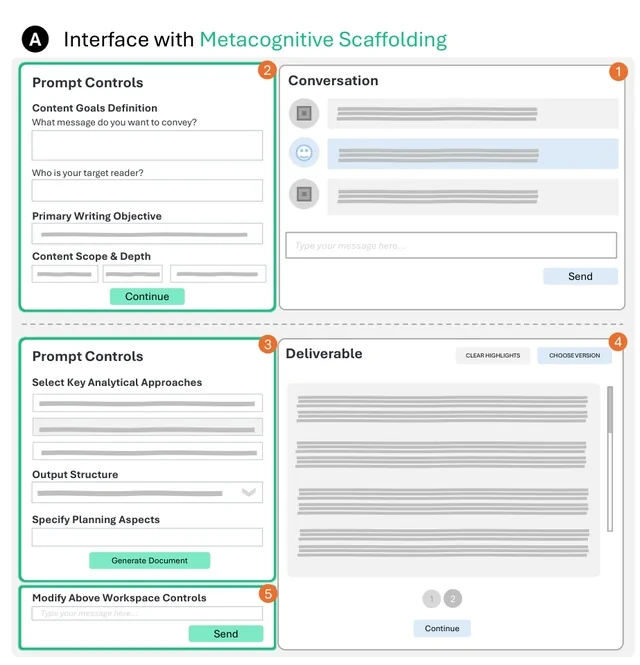
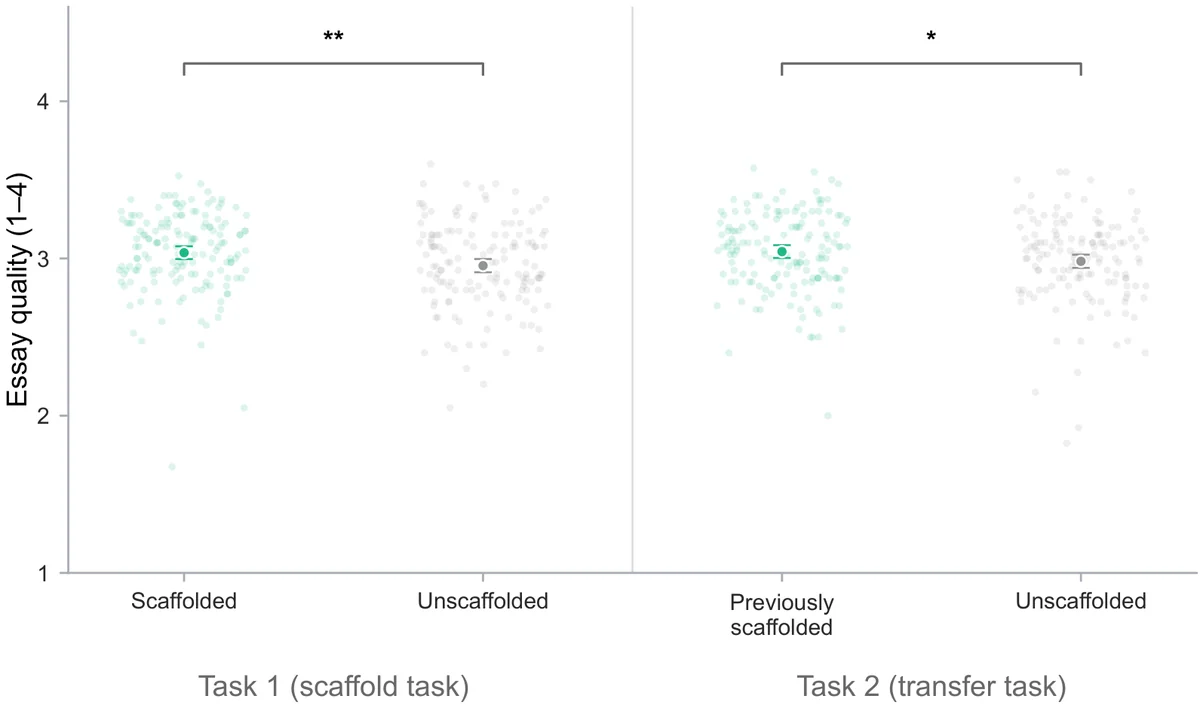
For the first brief, 153 people used the controls and 144 used a standard AI chat. For the second brief, neither group had them. Compared with the standard chat, people who used the controls:
- Wrote higher-scoring briefs, and the small advantage held on the second brief.
- Wrote later prompts that stated their goals more clearly and broke the work into steps more often.
- Were more likely to recall each brief’s topic three days later, although only about half answered the follow-up.
- Rated the AI as less helpful, felt less in control, and reported more workload while using the controls.
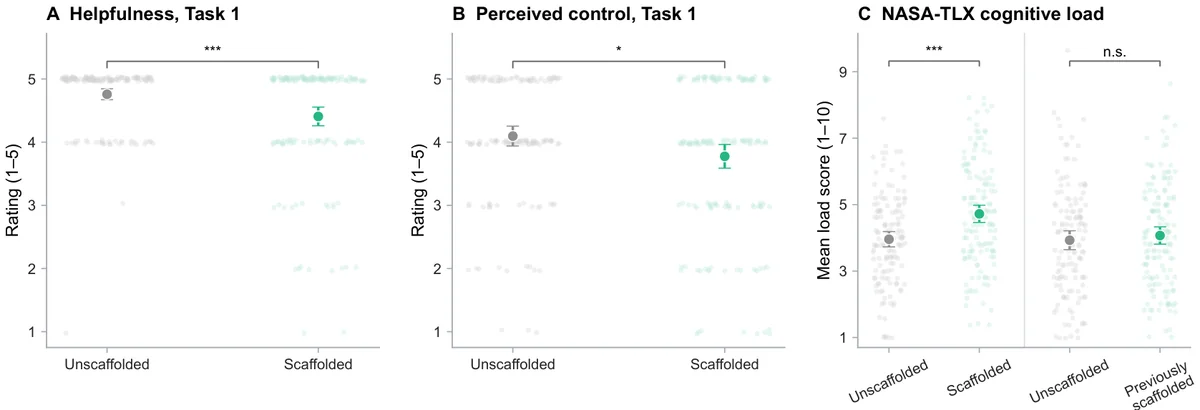
We call this productive friction: support that feels harder while it is in use, yet improves the outcome. Controls like these do more than save typing. They prompt people to say what they want and to plan the work before the AI drafts.
The study has limits. It was one online session of one-off writing tasks, it tested carry-over within that session rather than over weeks, and it tested goal setting and task breakdown together.
Build with Promptions
Developers get Promptions as a TypeScript monorepo for AI-powered applications built with React, Fluent UI, and OpenAI integration. The project includes chat and image generation interfaces, plus shared UI components and LLM utilities. The repo is at https://github.com/microsoft/Promptions. You can fork it, customise Promptions for your own application, or contribute to the project, whether you are building a chatbot, a coding assistant, or a creative writing tool.