Research brief
Takeaway: Shared slides can rely on 'turn-taking in control' (taking turns at steering the display, as at talk). In a small meeting where anyone could steer from their phone, people kept order by reading each other's gaze, bodily conduct and talk.
Why this matters
- What was known
- Slideware is built for one presenter controlling the slides for a passive audience, which limits generative and evaluative group work. Systems that extend control to attendees exist.
But there is limited detailed research on how to design such multi-person attentional control and facilitate collocated interactions without disrupting existing work practices.
(Abstract, p. 3) - What this paper adds
- Rather than testing features in a lab, we followed one real design meeting with a room camera and a camera on each phone. We analysed how taking turns at controlling the slides meshed with taking turns at talk.
Our analysis revealed that the limited shared ownership of slides augmented participants' agency within the constraints of collocated talk, and order over shared document control was accomplished by talk and bodily conduct.
(§5, p. 39) - Who it matters to
- Designers of slideware and of technologies for collocated, multi-device meetings. (§5, p. 39)
Research questions
- How would such turn-taking opportunities in control unfold?
- Would people self-select at transition-relevance points?
- How would transition-relevance points for talk be (re)defined to accommodate turn-taking in control?
Method and data
- Design
- Naturalistic case study of one design review meeting using Office Social (see Prototype). Qualitative multimodal video analysis of talk, bodily conduct and slide control in ten fragments, drawing on conversation-analytic turn-taking.
- Prototype
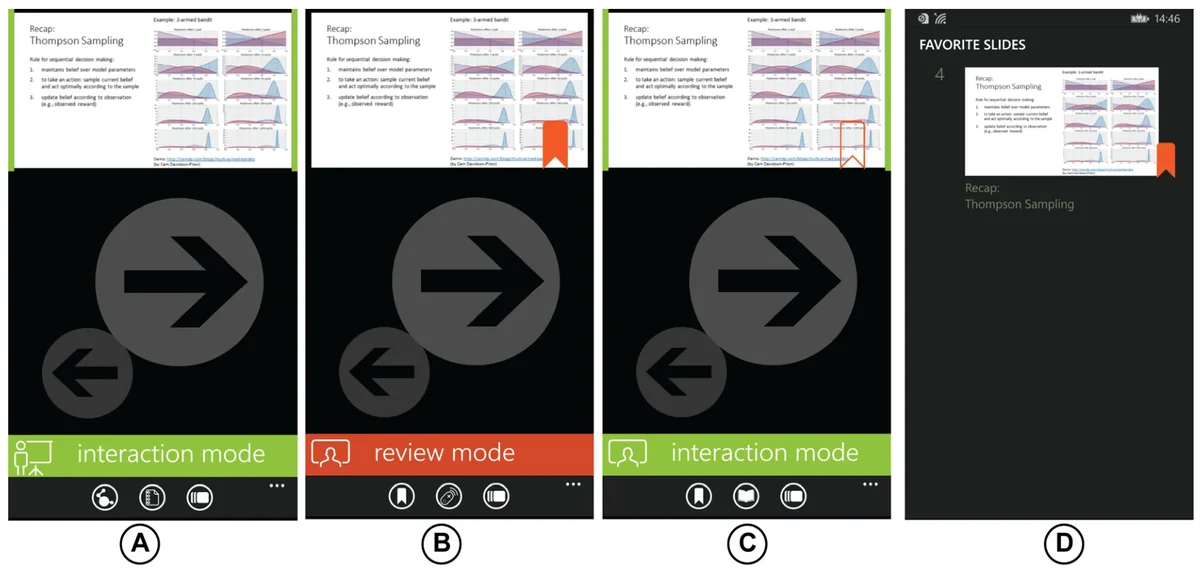
- Office Social, an experimental add-in for Microsoft PowerPoint with a companion smartphone app, built on Microsoft's Office Remote. The presenter's PC runs a local server that several phones join with a session code, as presenter or attendee. Attendees start in Review Mode: a private copy of the deck on their phone that they can follow along with, browse on their own and bookmark, without changing the shared screen. When a presenter turns on Interaction Mode, any attendee who opts in can move the shared slides forward and back, and drag a single on-screen pointer by touching their phone, without asking anyone. The display does not show who is in control. It was not compared with another system.
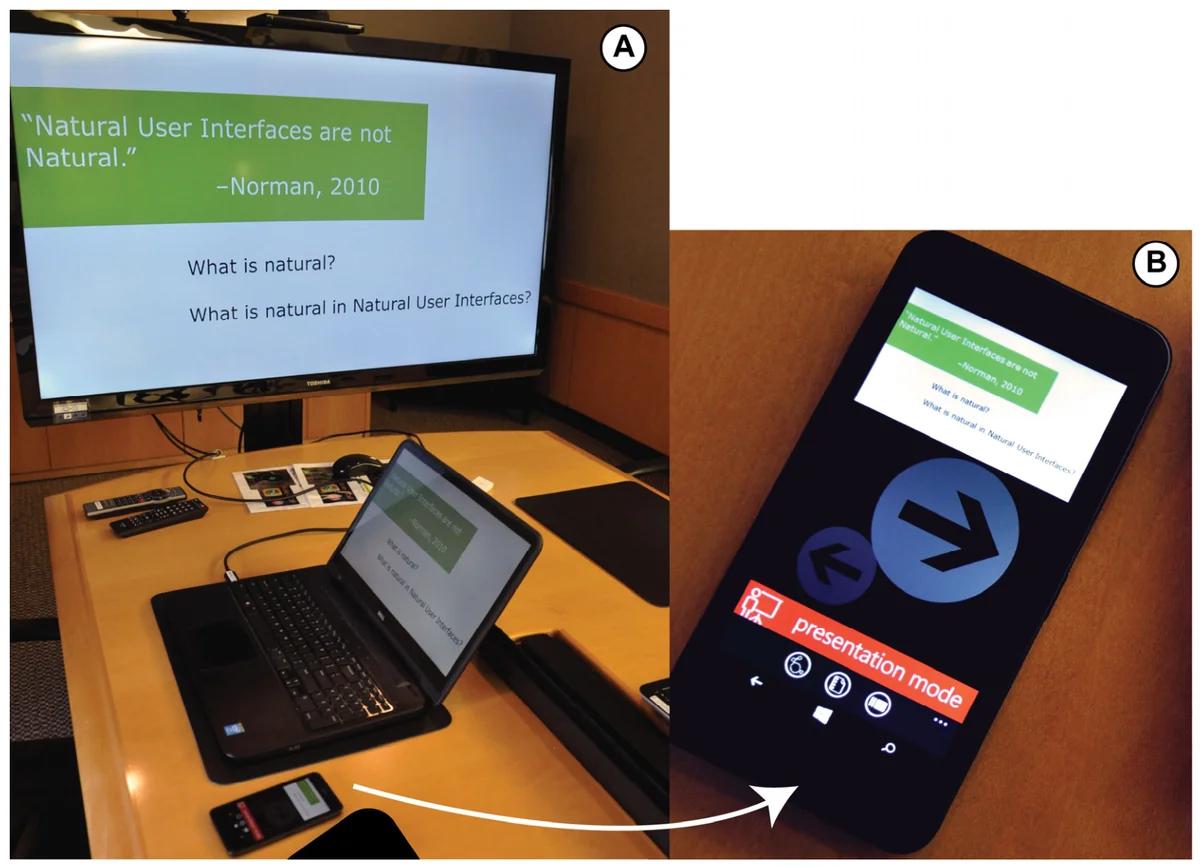
Figure 1. Office Social is designed as a PowerPoint add-in (A) and a companion smartphone app (B). When a slideshow is launched, the slide on the laptop screen is mirrored on the presenter's smartphone and the public display. Henceforth, the presenter can use Office Social as a remote control during the presentation. From the paper, Fig. 1, p. 10. - Setting
- The fourth and final meeting between a freelance designer and her client, in the client's house, deciding on a logo for the client's startup. Slides were available on a paper printout, the designer's laptop, a large television display and all three participants' phones.
- Participants / data
- Three participants: the designer Sara (female, 26), her client Zoe (female, 26) and Zoe's friend and adviser Mel (female, 30).
- Duration
- The meeting lasted approximately two hours.
- Analysis
- A room camera and chest-mounted GoPro cameras on each phone. The four video streams were aligned for multimodal analysis of talk, bodily conduct and slide control, transcribed with a simplified Jefferson system.
Findings
Control was opened up in the flow of talk. Only the presenter could switch on shared control. In the logo design meeting we studied, the designer did so as soon as an attendee began referring back to an earlier slide, so control was opened up without breaking off the discussion. #
“No explicit verbal permission is requested, but democratizing slide control is achieved via implicit verbal and nonverbal conduct.”
Private review fed group discussion. While others talked, the client used her phone to look back through and bookmark slides on her own, reflecting and preparing what to say next. She then brought those slides up on the shared television to discuss them with the group. #
“Such loosely-coupled work often led to tightly coupled group discussions, where attendees controlled the slides on the shared display to get everyone on the same page”
Pointing at details from your seat. Attendees used the phone's on-screen pointer to indicate fine details of a logo on the shared television without leaving the sofa. The screen did not show who was pointing, so the others worked it out from context. #
“We rarely encounter such bodily actions from attendees in a presentation; presumably, because fine-grained deixis would require walking up to the central display and is socially burdensome.”
Clashes were repaired in talk. Twice, two people tried to change the shared slide at the same moment. Once the client quietly let go while the designer was making a point. Once the adviser said she was using it, and the designer gave way. #
“institutionality of talk did not obviously provide for ordered turn-taking in control in this instance, a verbal explication was required”
Order without floor control. The system had no technical rules for who could control the shared display and did not show who was controlling it. Participants kept the meeting orderly anyway, reading each other's gaze, posture and talk, and the system left room for ordinary conversational repair. #
(§4.3, p. 36)Audience and presenter roles blurred. Attendees did not just watch the designer's slides. They chose what the whole group looked at and pointed at what mattered to them. #
“Shared attentional control seemed to overcome the boundary between producer and consumer of information, central to current models of presentation organization.”
Questions this paper answers
- Does letting everyone control the slides in a meeting cause chaos?
- Not necessarily. People can take turns steering a shared display much as they take turns at talk, reading each other's gaze, posture and speech. In a real design meeting with no technical floor control, two clashes over the slides were repaired, once by someone giving way and once by talk. (See §4.3, p. 36; §4.3, p. 36.)
- Does it matter that a shared screen does not show who is controlling it?
- Not much in a small meeting. People worked out who was navigating or pointing from each other's gaze, bodies and talk. That relied on there being only three people, and probably would not work in much larger meetings. (See §4.4, p. 38; §4.3, p. 36.)
- Why would attendees want their own copy of the slides during a meeting?
- It lets them think separately without leaving the conversation. A private copy let attendees reflect on slides and plan their next contribution. They could then put the right slide on the shared screen at the right moment to bring the group with them. (See §4.3, p. 37; §4.3, p. 37.)
Contributions and implications
- Support for collocated interaction should take account of existing conversational methods for achieving order rather than imposing prescriptive technological ones.
We suggest that supporting collocated interactions should take account of the existing conversational methods for achieving orderly collaboration rather than superimposing prescriptive technological methods of order.
(Abstract, p. 3) - Design technologies to coexist with other artefacts such as paper, so their affordances complement each other.
Designing technologies to co-exist with other artifacts would allow exploiting their respective affordances in complementary and contextually relevant ways.
(§4.4, p. 38) - Replicating slides across paper, a shared display and personal phones appeared to help people move between independent and joint work rather than fragmenting the meeting.
the replication of slide content across different affordances, paper, shared large display, and personal handhelds, appeared to enable switching between loose and tightly coupled work
(§5, p. 39)
Limitations
- Participants could tell who was controlling the display because the meeting was small. This would probably not generalise to much larger meetings.
This was possible because of the small size of the design meeting (3 participants) and would probably not generalize to much larger meetings.
(§4.1, p. 34) - Speech-type presentations such as keynotes and lectures may not benefit, and open control there could cause disruption. Only future studies can show this.
Reframing slideware to facilitate equitable participation in other types of structured presentations might create unwanted disruptions, disorderly conduct, and security breaches
(§4.5, p. 38) - The socio-material organisation might differ if shared control were through laptops or tablets rather than phones.
›Concepts
- Open system
- Hewitt's concept, on which Office Social's design draws:
a non-prescriptive system that enables articulation work, i.e., supports meeting participants to manage prevailing work practices instead of disrupting them by imposing new workflows
(§2, p. 11) - Tightly and loosely coupled collaboration
- A spectrum from CSCW research (e.g., Gutwin and Greenberg) that we use for meeting work around shared slides:
Collaborative action in these settings can be seen as ranging from very tightly coupled action to more loose couplings of action depending on the extent of coordination, synchrony, and action dependency.
(§1.1, p. 7) - Review Mode and Interaction Mode
- In Office Social, attendees can privately review and bookmark a copy of the deck (Review Mode), or, once a presenter enables it, navigate and point on the public display (Interaction Mode). (§2, p. 12)
- Turn-taking in control
- Our analytic focus:
we focus on how turn-taking in control (i.e., turn-taking in controlling a document on the public display) interplays with turn-taking in talk
(§3.2, p. 14)
Figures
How to cite
Debaleena Chattopadhyay, Francesca Salvadori, Kenton O'Hara, and Sean Rintel. 2018. Beyond presentation: Shared slideware control as a resource for collocated collaboration. Human-Computer Interaction 33 (5-6), 455-498. https://doi.org/10.1080/07370024.2017.1388170
This brief was prepared with AI assistance and published by Sean Rintel. It is not the authors' published text. Page numbers refer to this PDF.