Research brief
Takeaway: Ephemeral UI (controls an AI generates fresh for each prompt) can help people steer AI explanations. Knowledge workers rated this dynamic prompt middleware more effective than fixed controls and said it eased context-giving and prompted reflection. But how the AI would apply an option often stayed hard to predict.
Why this matters
- What was known
- Prompting generative AI is hard, from expressing context in text to the metacognitive demands it makes. Graphical 'prompt middleware' helps users build prompts, but has not been generated dynamically for the user's task in comprehension and learning.
close attention has not yet been paid to generating middleware dynamically, adapted to the user's specific task at hand, in the context of comprehension and learning tasks
(§2, p. 3) - What this paper adds
- Controls designed in advance cannot anticipate the breadth of knowledge work. We build a system that generates controls for each request instead, compare it in a controlled study with fixed generic controls, and derive design implications.
In this paper, we propose instead to generate prompt middleware customized to the user and task.
(§1, p. 2) - Who it matters to
- Designers and developers of generative AI tools, especially for comprehension and learning in knowledge work, and researchers of AI as a tool for thought.
Our findings suggest that dynamic prompt middleware can improve the user experience of generative AI workflows.
(Abstract, p. 1)
Research questions
- What are user preferences for control of AI responses in comprehension tasks? [RQ1]
- Which form of control is perceived as most effective for controlling AI responses? [RQ2]
- What are the trade-offs of Dynamic PRC and Static PRC prompt middleware for controlling AI responses? [RQ3]
Method and data
- Design
- A formative survey with a design probe, then a controlled within-subjects lab study comparing Dynamic PRC and Static PRC, counterbalanced for condition and task-set order.
- Prototype
- Dynamic Prompt Refinement Control (Dynamic PRC), a web-based chat assistant built with React and TypeScript, with responses from gpt4-turbo. The user types a request, for example to explain a spreadsheet formula. One language model (the Option Module) reads the request and generates controls tailored to it, such as radio buttons for explanation detail level or learning objective, with starting values already chosen. A second model (the Chat Module) answers using the request plus those selections, and regenerates the answer whenever the user changes a control. Users can also ask in plain language for controls that apply to the whole session (for example, response format), edit them directly as JSON, or pin a generated control so it applies to every later request. It was compared with Static PRC (the same chat with a fixed list of generic explanation controls derived from the formative survey).
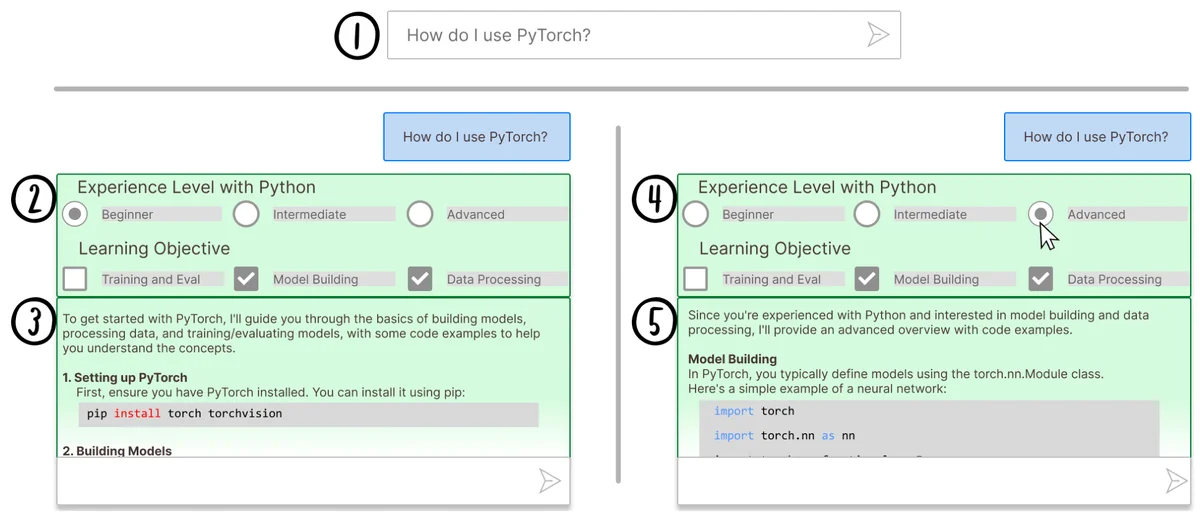
Figure 1: Schematic overview of Dynamic Prompt Refinement Control interface for generating inline prompt refinement options to increase user control of AI-generated explanations (derived from real system use). (1) User prompts the system. (2) The Option Module takes the user's prompt as context to generate prompt options which provide prompt refinements for the user to select. (3) The Chat Module uses the user's prompt and pre-selected options to generate an initial response. (4) The user can initiate refinements by selecting their preferred options in the UI. (5) On each change, the Chat Module regenerates the response based on the new selections. From the paper, Fig. 1, p. 1. - Setting
- Formative survey of knowledge workers at a large software company. Lab study with knowledge workers from diverse occupations, located on various continents.
- Participants / data
- Formative survey n = 38. Lab study n = 16 (8 men, 8 women), mostly regular generative AI users.
- Duration
- Each lab session took approximately 90 minutes: 6 tasks (code explanation, complex topic understanding, skill learning), 7 minutes per task.
- Analysis
- Post-task, post-condition and post-study questionnaires (including an adapted NASA Task Load Index) compared with Mann-Whitney U tests. Think-aloud and semi-structured interview data analysed with iterative open coding and thematic analysis, refined by negotiated agreement.
Findings
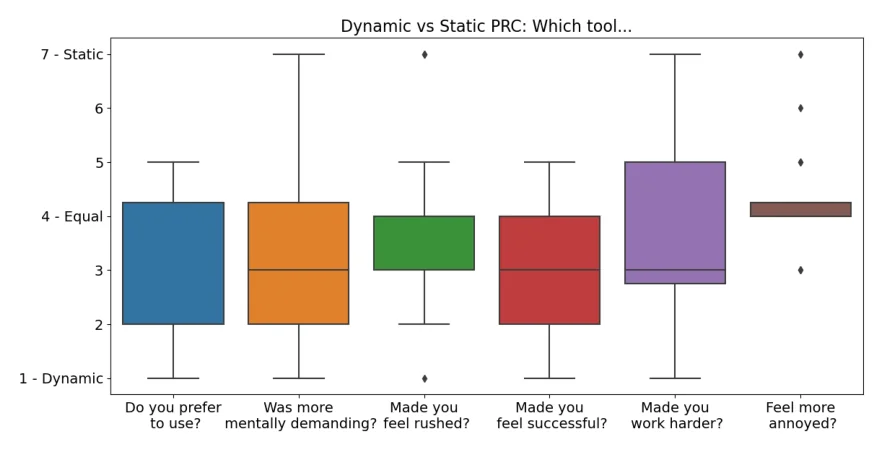
Preferred, though not more successful. Knowledge workers in a lab study used both tools on comprehension tasks. Compared directly, most preferred the controls generated for each request over the fixed ones, and felt slightly more successful but also slightly more stretched with them. Their ratings of task success after each tool did not differ significantly. #
“all bumper rails at the bowling alley for getting to where you need to go”
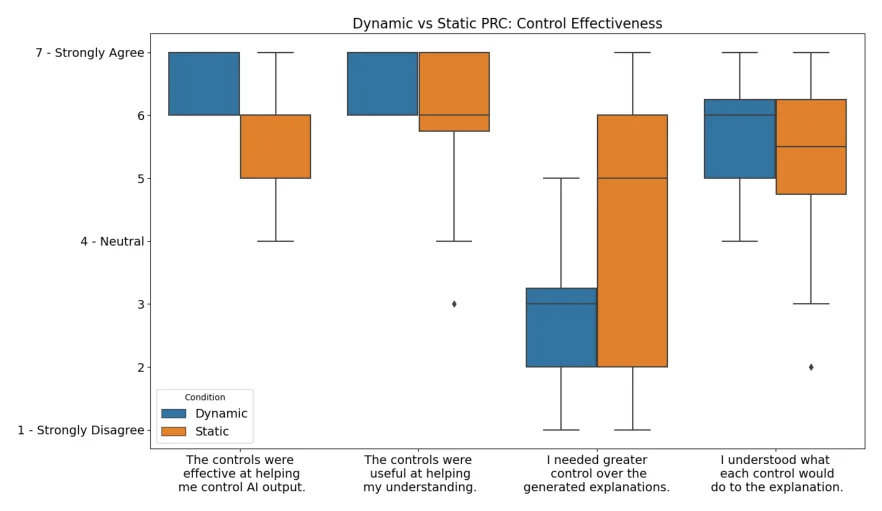
Rated more effective for steering. Participants rated the generated controls significantly more effective than the fixed ones at controlling the AI's explanations, and said they needed less extra control. The generated controls were not rated more helpful for understanding the task's concepts, and for explaining Python code the fixed controls helped understanding more. #
(§6.2, p. 12)Easier to give the AI context. Several participants said the generated controls made it easier to tell the AI about their situation and needs. For some, the options shown with each answer replaced much of the typing of follow-up prompts. #
“I felt like dynamic would really help me shortcut what I'm doing manually today.”
A scaffold for thinking. Several participants said the generated options worked as guidance, showing them what they could ask the AI for and prompting them to reflect on their task. #
“were things that I would maybe assume the system couldn't handle or that it wouldn't be able to do.”
Changing options took effort. Some participants found the generated controls more mentally demanding, because a new set of options appeared with each request, though self-reported mental load did not differ significantly between the two tools. #
“required more activation [mental] energy”
Hard to predict what an option does. With both tools, participants found it hard to tell how the AI would apply a selected option. Responses sometimes changed in unexpected places, changed too little, or ignored one option because of another. #
“some options nullify other options that you put in”
Questions this paper answers
- Should the controls in an AI interface adapt to each request, or stay fixed?
- Each has strengths. Controls generated for each request make it easier to give the AI context, and people preferred them and rated them more effective for steering explanations. Fixed controls were not rated significantly less useful for understanding concepts, and helped more when explaining code. (See §6.3, p. 13; §6.2, p. 12; §6.3, p. 12.)
- Are controls that change with every request harder to use?
- Somewhat. Because new options appear with each request, some people felt they took more mental energy, and overall they were judged slightly more demanding. Yet self-reported mental load did not differ significantly from fixed controls. (See §6.3, p. 13; §6.3, pp. 13–14.)
- Can prompt controls help people think about their task, not just the AI's output?
- They can. Options generated for a request show what one could ask for. Several people said this helped them work out what they did not know and reflect on their task, not only shape the answer. (See §6.3, p. 13.)
- Why is it hard to predict what an AI control will do?
- Users could not always tell what an option would change or whether the AI had applied it. Options altered unexpected parts of a response, changed too little, or cancelled each other out. Trying each option and watching the answer regenerate helped. (See §6.3, pp. 14–15.)
Quantitative results
| Measure | Result | Where |
|---|---|---|
| Formative survey: importance of having control over the AI response (5-point scale) | Median=4.0 [Agree], Mean=4.3 | §3.3, p. 4 |
| Overall tool preference (1 = Dynamic PRC, 7 = Static PRC, 4 = equal) | median=2.0, mean=2.81 | §6.1, p. 10 |
| Which tool was more demanding to communicate with (1 = Dynamic PRC, 7 = Static PRC) | median=3.0, mean=3.31 | §6.1, p. 10 |
| Helpfulness for controlling AI responses (7-point scale), Dynamic vs Static PRC | Dynamic PRC median=6.5, mean=6.38 vs Static PRC median=6.0, mean=5.69 | §6.1, p. 11 |
| Controls effective at helping control AI output, Dynamic vs Static PRC | mean=6.44 vs mean=5.81; U: 73.5, P-value: .0245, r: .363 (medium effect), power: .275 | §6.2, p. 12 |
| Needed greater control over the explanations, Dynamic vs Static PRC | mean=2.75 vs mean=4.44; U: 190.5, P-value: .0174, r: .42 (medium effect), power: .349 | §6.2, p. 12 |
| Controls useful for understanding task concepts, Dynamic vs Static PRC (not significant) | mean=6.44 vs mean=5.88; U: 94, P-value: .164 | §6.2, p. 12 |
| Per-task rating of how much options helped understanding, Task 4 (explaining Python code): Dynamic PRC worse than Static PRC (the only significant per-task difference) | U: 12.0, P-value: 0.0355 | §C.1, p. 22 |
Contributions and implications
- Dynamic controls should give appropriate mental load, for example through progressive disclosure, rather than overwhelming users. (§7.1, p. 15)
- Give users control over and transparency about how and where the AI applies options, for example with response diffs. (§7.1, p. 15)
- Use relevant user context, such as past AI use or open files, to generate and pre-select controls. (§7.1, p. 15)
- Dynamic options could act as metacognitive interventions, making such systems tools for thought.
This suggests that Dynamic PRC can potentially act as a tool for thought by assisting user thinking around their tasks.
(§7.2, p. 16)
Limitations
- We did not compare either system with a baseline chat interface. (§7.4, p. 16)
- Formative survey participants all worked at one tech-forward organisation. (§7.4, p. 16)
- Only comprehension tasks were evaluated, and not over longer periods of use. (§7.4, p. 17)
›Concepts
- Prompt middleware
- Graphical interface elements that help users construct and manipulate prompts instead of typing everything.
a general category of techniques that use graphical interface elements for manipulating prompts, sometimes referred to as" prompt middleware" [44], to ease the cognitive burdens of text entry and manipulation
(§2, p. 3) - Dynamic Prompt Refinement Control (Dynamic PRC)
- Our system: an Option Module analyses the user's prompt and generates controls (radio buttons, checkboxes, free text) whose selections refine the prompt sent to a Chat Module.
Dynamic Prompt Refinement Control (Dynamic PRC), which generates UI elements for prompt refinement based on the user's specific prompt
(Abstract, p. 1) - Static Prompt Refinement Control (Static PRC)
- The comparison condition: a fixed list of generic controls derived from the formative survey, offered for any prompt.
Static Prompt Refinement Control (Static PRC), which offers generic controls
(Abstract, p. 1) - Session options
- Requested in natural language, edited as JSON or pinned from inline options. The paper's definition:
Session options are options that apply to every prompt and AI response in a given session with the Dynamic PRC system.
(§4.2, p. 6)
Figures
How to cite
Ian Drosos, Jack Williams, Advait Sarkar, Nicholas Wilson, Sean Rintel, and Payod Panda. 2025. Dynamic Prompt Middleware: Contextual Prompt Refinement Controls for Comprehension Tasks. CHIWORK 2025. https://doi.org/10.1145/3729176.3729203
This brief was prepared with AI assistance and published by Sean Rintel. It is not the authors' published text. Page numbers refer to this PDF.