Research brief
Takeaway: Maximizing environmental validity (studying real use in its real setting) is a process of elimination. Each recording option is judged by how much it intrudes and what it costs. Home video calls were best recorded by the researcher's computer sitting silently in each group call, leaving people comfortably themselves.
Why this matters
- What was known
- Earlier qualitative studies of desktop videoconferencing were either researchers studying their own use at work or novices in fairly controlled workplaces with on-site recording equipment.
they are still some distance from the high level of environmental validity that would be achieved if novice users could be recorded remotely in their own environments
(§1, p. 1) - What this paper adds
- An account of the recording method that also documents the rejected and failed alternatives (home recorders, screen capture, remote desktop sharing, tapping the servers), so others can see why the chosen setup won. (§1, p. 1)
- Who it matters to
- Researchers who want naturalistic recordings of technology use in homes, and the developers of videoconferencing software, who gain usability data.
from both an academic and developer standpoint the resultant data should be of high quality since it minimizes the impact that the research has on the participants
(§1, p. 1)
Research questions
- How can novices' desktop videoconferencing in their own homes be recorded remotely, on their own timetable and with no extra software or effort, so that the research situation approximates real-life use?
- What were the challenges and benefits of the chosen setup for the project's academic goals and for the usability goals of the industry partner?
Method and data
- Design
- Methodological account of developing a remote recording setup for a longitudinal field study of how novices become familiar with desktop videoconferencing. Local recording (VCRs, digital recorders, screen capture) and remote sharing or server-tapping options were tested and rejected.
- Setting
- Participants' own homes. Calls ran over Wave Three Inc.'s Session software, with recording computers at the research location.
- Participants / data
- 12 pairs maintaining long-distance personal relationships.
- Duration
- Pairs tried DVC for two to three months. The recording system ran seven days a week for nine months, across a three-month and a four-month data collection round.
- Analysis
- Ethnomethodological, observation-first approach: an unbroken longitudinal record of every call, combined with interviews.
Findings
Recorders in the home were too intrusive. For a study of novices using video calls at home, putting recording equipment in homes was rejected. Participants would have had to run and troubleshoot VCRs (most used laptops). In tests, screen-capture software produced huge files, crashed computers and drifted out of sync. #
“Requiring participants to record themselves is highly unnatural, emphasizing their awareness of the unreality of the situation”
Home upload was too thin to share screens. Streaming each participant's screen to the researcher with remote desktop software failed in tests. Home broadband could not upload the video call and the shared screen at once, and calls froze or degraded. #
(§3.2, p. 4)A hidden third party looked like a pair. Most group video software shows every member in one window and marks a non-participant with an obvious placeholder, which pilot participants talked about. Session shows each person in a separate, optional window, so a call of three could look like a call between two. #
“a placeholder would immediately and constantly alert participants to the fact of their being recorded, significantly reducing sense that they were having a private dyadic interaction”
Recording became almost invisible. Participants simply logged on, started their partner's video and talked. They knew they were being recorded, but none reported feeling intruded on. #
“a single name in their contact list, which most participants reported placing away from the video windows or minimizing so as to not be visible at all”
Round-the-clock logins exposed a server fault. Because the recording computers stayed logged in day and night, the bridges went down repeatedly. The software maker had not known about this server problem, which could stop people calling when they wanted. #
(§6, p. 10)People were at ease on camera. All pairs spontaneously showed each other personal objects, and displays were sometimes copied. When one put on sunglasses, the other went and found a pair too. They also folded laundry, ate and pulled faces on camera. #
“the environmentally validity of the project situation was high enough that the participants felt comfortable enough to do frequently do 'as they would' instead of only 'as they ought'”
Questions this paper answers
- How can researchers record people's video calls at home without disturbing them?
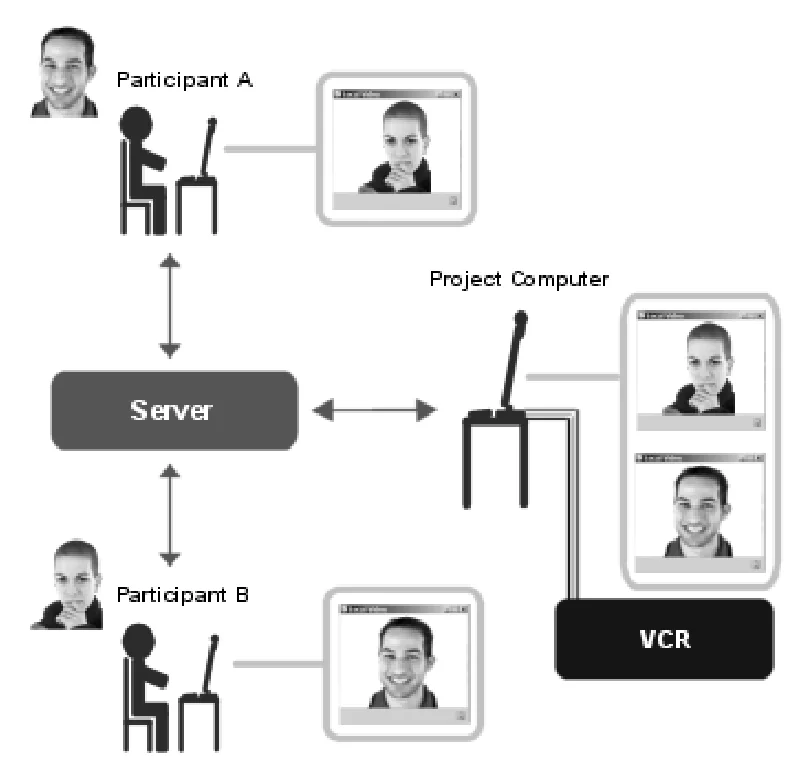
- By joining the call instead of entering the home. Each pair called through a multi-party bridge on which the researcher's computer sat as a silent, unseen third party. No recording equipment or extra software was needed in the home, and one recording captured both sides as they experienced it. (See §3.3, p. 5; §3.3, p. 6.)
- Why not just have participants record their own video calls?
- Because recording yourself is highly unnatural. It reminds people that an ordinarily fleeting conversation is being kept, which makes the situation feel unreal. It also brings equipment and chores into the home, and invites gaps in the record, deliberate or accidental. (See §3.1, p. 3.)
- Did people behave naturally knowing their video calls were recorded?
- Largely yes. People were aware of recording but reported no intrusion, and all pairs spontaneously showed personal objects. They folded laundry, ate and pulled faces, and sometimes copied each other's displays. (See §3.3, p. 6; §5, p. 10.)
- Can academic field studies help software companies find usability problems?
- They can, as a side effect. When computers recording long-distance pairs' home video calls stayed logged in to call bridges around the clock, they exposed repeated bridge downtimes the vendor had not known about. These could stop people calling on demand and might not have surfaced in ordinary use. (See §6, p. 10.)
Quantitative results
| Measure | Result | Where |
|---|---|---|
| Participants using laptops | over 80% | §3.1, p. 3 |
| Average capped home upload limit | around 300 kbps | §3.2, p. 4 |
| Recording setup | Four computers on four separate bridges; VCRs set to record for 9 hours; ran seven days a week for nine months | §3.3, p. 6 |
| Bridge downtimes: first round (three months) vs second round (four months, after daily reboots) | 24 occasions vs 7 downtimes | §4, p. 8 |
Contributions and implications
- Remote-sharing tools are of limited use for testing bandwidth-heavy home applications while home upload bandwidth stays low. (§3.2, p. 4)
- Because Session showed video in separate windows and did not start any contact's video automatically, the recording was almost transparent to participants. (§6, p. 10)
- A setup born of a shoestring budget delivered real benefits for environmental validity. (§6, p. 10)
Limitations
- The physical environment was not recorded, only the on-screen call, for resource, intrusion and ethical reasons.
On-screen DVC action, then, was to be the crux of the observational data.
(§3.1, p. 2) - Tapping the call streams at the server would have been fully transparent to users but was beyond the project's resources.
Had these resources been available, this would have been an excellent solution.
(§3.2, p. 4) - Recording ran on timers rather than continuously, and fragile automation scripts and bridge downtimes sometimes lost video or stopped participants calling on demand.
There is, of course, some irony that to provide environmental validity an unusual use of the servers had to be instituted which then caused some problems.
(§4, p. 8)
›Concepts
- Environmental validity
- What sociological research usually calls ecological validity, renamed to stress that the physical setting of videoconferencing matters.
a concern that a controlled research situation should approximate the real-life situation that is under investigation
(§2, p. 2) - Multi-party bridge recording
- The researcher's computer joins each pair's call as a silent third party on a group bridge, so one recording captures both sides as they experienced it.
the access would be largely the same for researcher as the participants, and it would have the virtue of allowing one recording to capture all the interaction
(§3.3, p. 5) - Desktop videoconferencing (DVC)
- Video calling on personal computers. Here, novices using it to keep up long-distance personal relationships from home.
Figures
How to cite
Sean Rintel. 2007. Maximizing environmental validity: remote recording of desktop videoconferencing. HCII 2007. https://doi.org/10.1007/978-3-540-73105-4_100
This brief was prepared with AI assistance and published by Sean Rintel. It is not the authors' published text. Page numbers refer to this PDF.