Research brief
Takeaway: Cutting the 'interaction cost' of taking the floor can let presentation attendees shift fluidly between listening and contributing, such as reviewing slides on their phones before taking over the screen.
Why this matters
- What was known
- Presentation software gives one presenter exclusive control. Handing control to an attendee is awkward and socially conspicuous, and earlier multi-user systems needed dedicated infrastructure or fixed roles. (§INTRODUCTION, p. 1)
- What this paper adds
- A way for presenter and attendee roles to interchange fluidly using the phones people already carry, without dedicated infrastructure or fixed roles, studied in a real workgroup's meetings rather than in a lab.
We propose a system that reduces the interaction cost to switch fluidly between presenterattendee statuses, without entirely abolishing either of them.
(§RELATED WORK, p. 2) - Who it matters to
- Researchers and designers of presentation tools and social devices, and groups that hold small-to-medium informal presentations where presenter and attendee roles overlap.
Research question
- What practices and shifting dynamics of collaborative participation emerge when a workgroup can form an ad-hoc aggregation of its members' own devices to review and control presentation slides?
Method and data
- Design
- Field deployment of a working prototype (see Prototype), observed over a series of real meetings. Use cases were allowed to evolve naturally.
- Prototype
- Office Social, a PowerPoint add-in on the presenter's PC plus a Windows Phone app, extending an earlier single-presenter remote-control app (Office Remote). People join by connecting their phone to the presenter's PC over any wireless network, using its address posted in the room (for example as a QR code). Anyone joining as a presenter controls the slides from their phone, with notes, a preview of the next slide and a pointer, and decides whether attendees may only review or may also interact. In review mode, attendees browse their own copy of the slides and bookmark them without affecting the shared screen. Once the presenter allows it, they can switch to interaction mode and navigate and point on the shared display, but not see presenter notes. There was no comparison condition.
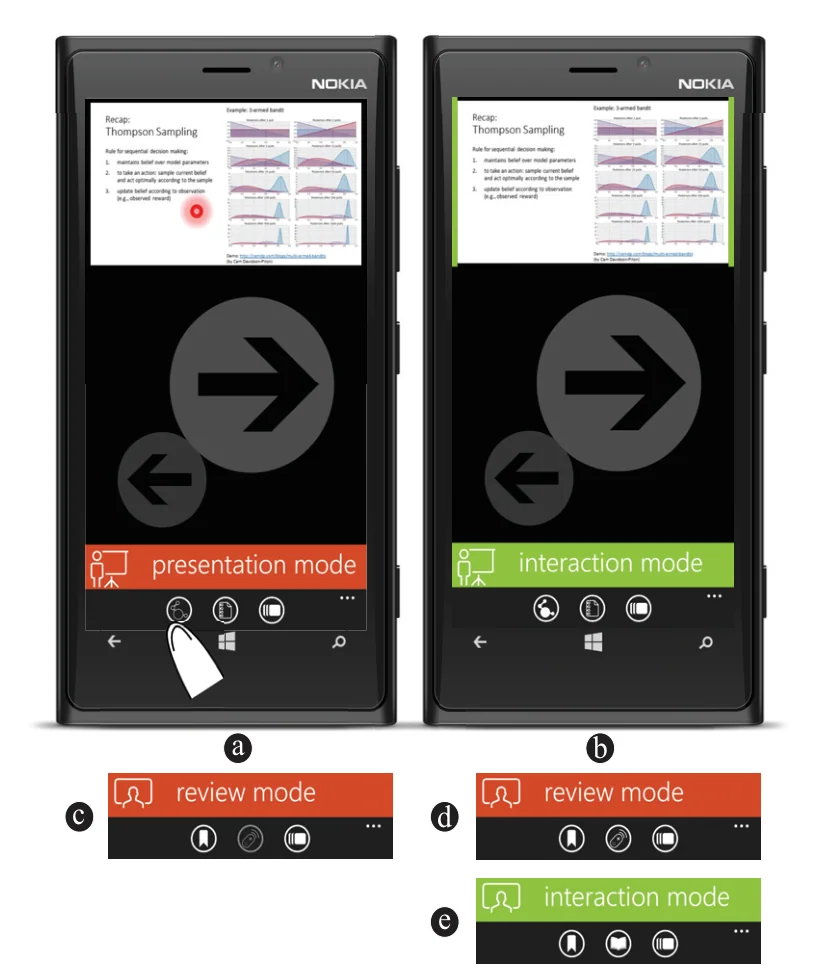
Figure 1. Office Social interface: when a presenter is in presentation (a) or interaction mode (b), attendees remain in review mode (c, d); while the presenter is in interaction mode, attendees can switch between review (d) and interaction (e). From the paper, Fig. 1, p. 2. - Setting
- Weekly project review meetings of a large research group (~20 members) in a corporate laboratory. Each meeting was about one hour with one or two presentations.
- Participants / data
- The system was installed on nine group members' smartphones. Four meetings with an average of 17 participants per meeting.
- Duration
- Four weeks.
- Analysis
- Qualitative: observation and video recordings of meetings, app usage logs, one focus group, and interviews with four participants (video-stimulated recall for two heavy users).
Findings
Rehearse privately, then take over. In a research group's weekly meetings, people about to co-present used private slide review on their phones to rehearse before taking over, and attendees lined up the slide they wanted before asking a question. #
“checking that my resources are marshalled to ask my question.”
Presenters free to move. Because slides could be controlled from any phone, presenting was no longer tied to the front of the room. In one instance, two co-presenters took control from their seats and walked to the front while presenting. #
(§FINDINGS, p. 3)Brief huddles around phones. In two instances, slides on a phone drew people into small side-by-side or L-shaped huddles to discuss the content, a kind of grouping rarely seen in presentations. #
“the formations, afforded by the micro-mobility of smartphones [9], were ad-hoc and short-lived”
Catching up and looking ahead. Attendees browsed slides privately to see what they had missed after arriving late, or to gauge how long a presentation would be and where it was going. #
“I knew I was late but realized I could catch up with the slides.”
Keeping everyone on the same page. When a discussion between the presenter and one attendee drifted away from the slide on screen, another attendee brought up the relevant slide so the whole group could follow. #
“thus taking responsibility for discussion coherence even if not actively engaged in the discussion”
Presenters shared control differently. Presenters varied widely in when, and whether, they opened control of the shared screen to attendees. #
“Three presenters waited until the end of their presentation, one launched it at the beginning, while one switched multiple times”
Questions this paper answers
- What happens when audience members can control presentation slides from their phones?
- Taking part becomes easier and more fluid. Over four weeks of a research group's weekly project meetings, people prepared privately on their phones and stepped in when ready. Co-presenters took over without a handover at the front, and attendees outside a discussion kept the group on the right slide. (See §FINDINGS, p. 3; §FINDINGS, p. 3; §FINDINGS, p. 4.)
- Is it useful to let attendees browse slides on their own phone during a talk?
- It can be. Private access let latecomers catch up on missed slides and let people preview where a talk was heading. On two occasions in a research group's meetings, small groups huddled briefly around a phone to discuss content, a grouping rarely seen in presentations. (See §FINDINGS, p. 3; §FINDINGS, p. 4.)
- Do presenters want to share control of their slides with the audience?
- It varied. In four meetings of one research group, three presenters opened control only at the end, one at the start, and one switched several times to hand over to co-presenters. This probably reflects different presentation styles and content. (See §FINDINGS, p. 3.)
Contributions and implications
- Giving attendees control may be harder in larger groups, where social mediation is harder to enact. Practices at different scales need study. (§IMPLICATIONS FOR RESEARCH, p. 4)
- Democratised control may create new tensions. Accidental or off-narrative slide changes could weaken slide changes as a way to focus attention, and presenters might respond with defensive designs or new norms. (§IMPLICATIONS FOR RESEARCH, p. 4)
- Engagement features could extend beyond bookmarking, for example sending presenters feedback to improve later deliveries. (§IMPLICATIONS FOR RESEARCH, p. 4)
Limitations
- A small-scale study of one workgroup. Other presentation scenarios are needed to validate the insights. (§CONCLUSION, p. 4)
›Concepts
- Interaction cost
- Our framing for why taking over the floor in a presentation is hard:
Interaction cost is the cost associated with bringing about the outcome of a particular interaction
(§INTRODUCTION, p. 1) - Review and interaction modes
- Attendees can privately browse a local copy of the slides or, once the presenter enables it, take over the big screen. By default
attendees remain in review mode and switch to the interaction mode only when explicitly choosing to control shared content
(§OFFICE SOCIAL, p. 2) - Ad-hoc aggregation of co-proximate devices
- The presenter's PC and the smartphones of presenters and attendees in the room, joined together for the presentation without dedicated infrastructure.
Office Social leverages the personal devices of both presenters and attendees into ad-hoc co-proximate relationships
(§CONCLUSION, p. 4)
Figures
How to cite
Debaleena Chattopadhyay, Kenton O'Hara, Sean Rintel, and Roman Radle. 2016. Office Social: Presentation Interactivity for Nearby Devices. CHI 2016. https://doi.org/10.1145/2858036.2858337
This brief was prepared with AI assistance and published by Sean Rintel. It is not the authors' published text. Page numbers refer to this PDF.