Research brief
Takeaway: Hybrid meetings can feel more like one shared space when people appear together in one scene rather than a grid of video tiles. Seating everyone around one virtual table, with fixed places and each person's own view of the room, was preferred, though less so by remote attendees.
Why this matters
- What was known
- Hybrid meetings tend to form in-groups in the room that sideline remote participants. Earlier spatial systems needed matching, expensive rooms or special hardware, and common video layouts give no consistent sense of who is where.
These studies all show how the structural asymmetry of being in the room versus joining remotely creates differences in group dynamics that need to be addressed to enable equitable participation in the hybrid context.
(§2.1, p. 3) - What this paper adds
- Three design principles for inclusive hybrid meetings, realised with ordinary cameras, microphones and displays rather than matched rooms or special hardware. They are tested against three commercial layouts with groups of colleagues split between a meeting room and remote desks.
blending rather than separating in-room and remote users; consistency in the spatial arrangement of people to give everyone a 'seat at the table'; and first-person perspective view
(§1, p. 2) - Who it matters to
- Designers of video meeting tools and hybrid meeting layouts, including commercial products, and organisations that want remote colleagues included.
we have an opportunity to modify the designs of our current video meeting tools to create a more satisfying hybrid meeting experience
(§9, p. 22)
Research question
- Does a hybrid meeting system that composites everyone into a common virtual room, with a consistent spatial layout and a unique first-person view for each person, provide a more inclusive experience for remote and in-person attendees than commercially available layouts?
Method and data
- Design
- Mixed-design user study: layout condition (Gallery, Together Mode, Front Row, Perspectives) within subjects, in-room versus remote between subjects, and Latin square counterbalancing repeated three times.
- Prototype
- Perspectives, a hybrid meeting system that places everyone in one virtual meeting room around a semi-circular table. People in the conference room see the virtual room projected life-size on the wall as an extension of their own room, with the remote participants' videos (backgrounds removed) seated around the table. Each remote participant sees the same room, with wall art, plants and doorways as landmarks, from their own seat at the table, so everyone keeps the same place whoever is looking. No one sees a video of themselves. Voices come from where each person appears, through a Dolby Atmos system in the room and headsets for remote participants. Each person in the room has their own webcam and head-worn microphone so they can be placed individually. Built as a Unity application using Microsoft Teams video streams. Compared with three Microsoft Teams layouts rebuilt on the same platform: Gallery (a grid of videos), Together Mode (everyone in one shared scene, all seeing the same view) and Front Row (remote people along the bottom of the room display, while remote people see a grid).
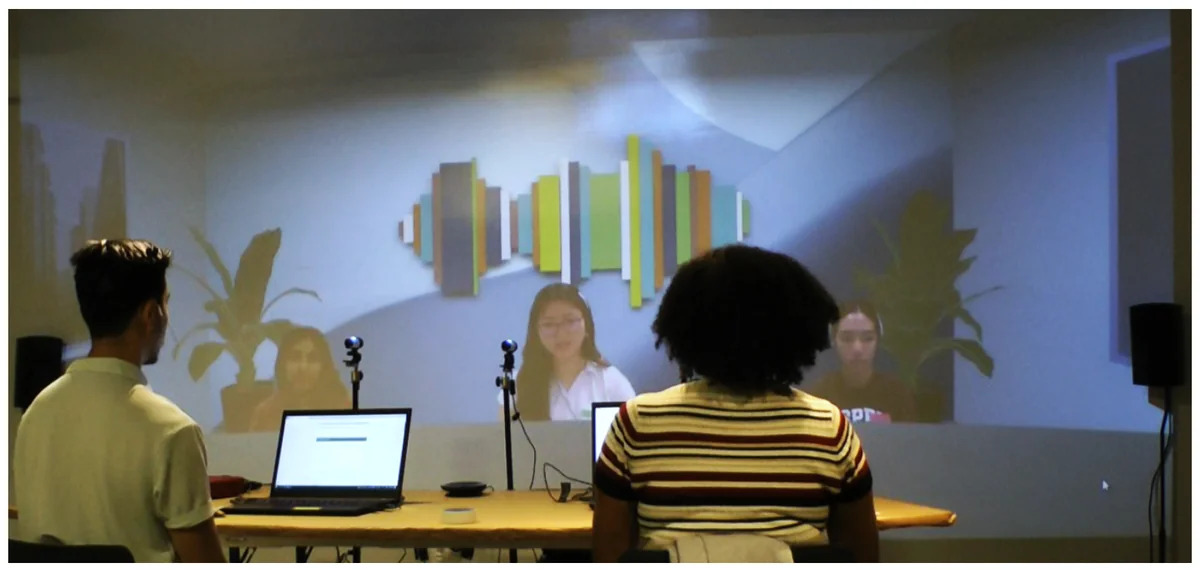
Fig. 1. The Perspectives prototype UX for those gathered together in the meeting room From the paper, Figure 1, p. 2. - Setting
- Simulated hybrid meetings. In each group of five people who knew each other, two sat in a conference room with a projected display and spatial audio, and three joined from separate offices set up as home workspaces. Groups did warm-up tasks (counting off to 30, an ice-breaker) and a five-minute group decision task in each condition.
- Participants / data
- 60 participants in 12 groups, mostly employees of the authors' company because of COVID protocols. 56.7% man and 43.3% woman.
- Duration
- Each session took between 90 and 110 minutes.
- Analysis
- Post-condition surveys (co-presence, perceived effort and other Likert items), a layout-sketching task and timing of the counting task as measures of cognitive load, final preference rankings, analysed with Aligned Rank Transform and repeated measures ANOVA. Thematic analysis of group interviews.
Findings
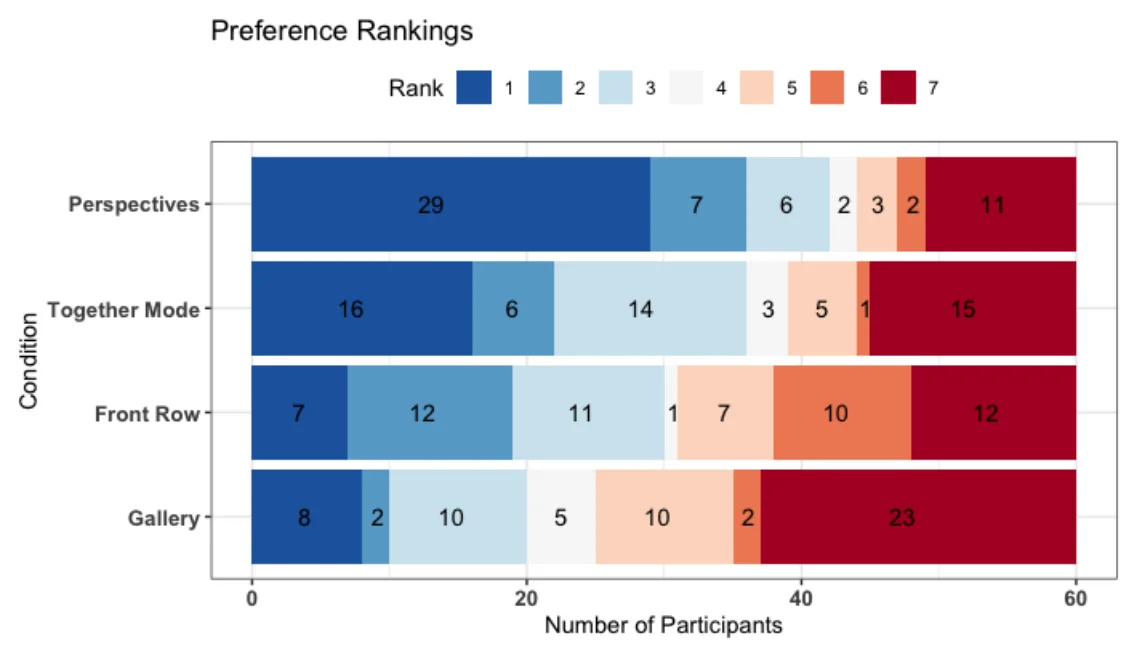
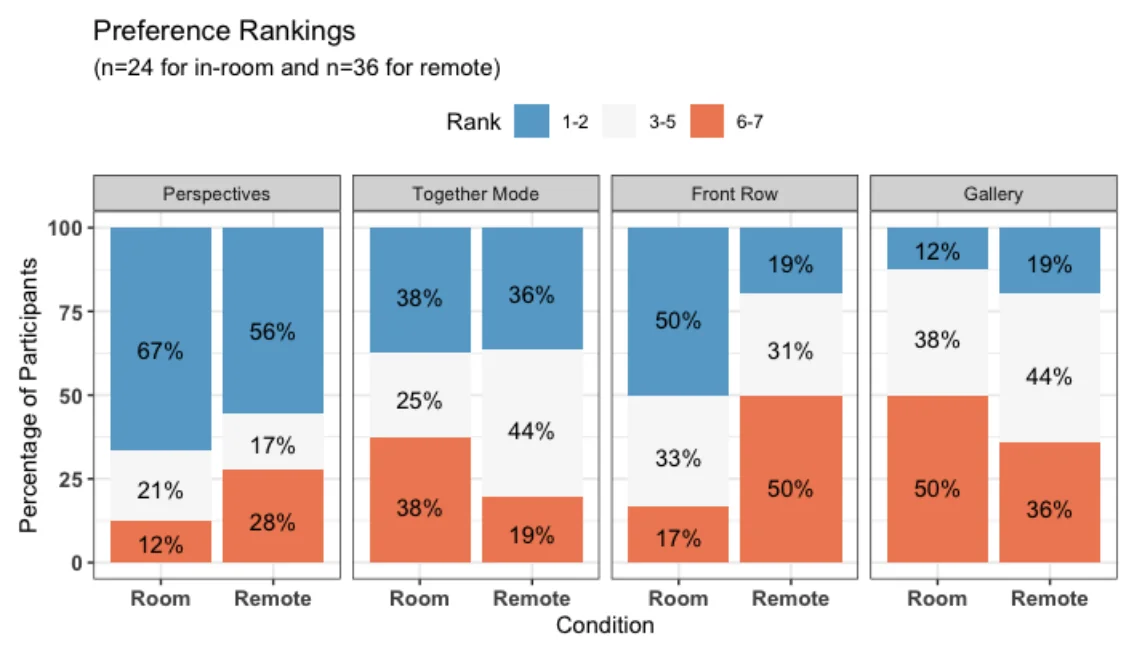
The shared table was preferred. Asked to rank the layouts after simulated hybrid meetings of five colleagues (two in a conference room, three remote), participants ranked Perspectives highest and the standard Gallery grid lowest. Preferences depended on whether people were in the room or remote. #
(§6.1, p. 14)Spatial layouts felt more like one room. Participants felt more in the same space as each other with layouts that place people in a shared scene than with the Gallery grid. In the room this held for Perspectives, Together Mode and Front Row, and remotely for Perspectives and Together Mode. #
“I liked the feeling of being physically in a room, it makes me feel more focused and engaged in the conversation and on others”
Easier to remember who sat where. After each layout, participants sketched from memory where everyone had been. They made fewer errors after Perspectives than after any other layout. Our reading: #
“participants were able to more readily develop a mental model in Perspectives compared to the other conditions”
Turn-taking around the table was faster. In a warm-up task in which groups counted off to 30 in turn, groups were faster with Perspectives than with Gallery or Together Mode. #
“groups were significantly faster in the Perspectives condition than in Gallery (p=.02) or Together Mode (p<.01)”
Remote attendees were less keen. Remote participants were more negative about Perspectives than people in the room, partly because they could not see themselves and felt seated across the table from the group, as if presenting to it. #
“Not seeing myself sucked”
Spatial audio helped in every layout. Voices that came from where each person appeared on screen were valued in every layout, for natural conversation and for following overlapping talk. #
“Multiple people were able to talk over each other and still be understandable (like a real conversation).”
Questions this paper answers
- Why does a grid of video tiles make meetings feel disconnected?
- A grid gives no consistent sense of where anyone is, because the tiles are arranged differently on each person's screen. In simulated hybrid meetings, a shared scene made people feel more in the same space. A fixed seating plan made the group easier to follow. (See §6.1, p. 14; §6.2, p. 17.)
- Does a consistent seating plan matter in video meetings?
- It seemed to. When everyone kept the same place around one table, seen from their own seat, people sketched the group's layout from memory with fewer errors. They also took turns around the table faster, suggesting a clearer mental picture of the group and possibly lower mental effort. (See §6.3, p. 18; §6.3, p. 18.)
- Should video calls stop showing you your own image?
- Opinions split. Some found no self view more natural and less distracting. Others, especially people joining remotely, missed it and wanted reassurance about how they appeared. People in the room missed it less, perhaps because sharing a room made them feel properly seen and heard. (See §6.1, p. 15.)
- Does a hybrid meeting design work equally well for people in the room and remote?
- Not always. Many benefits were stronger in the conference room, where the virtual table extended the real one. People joining remotely were more negative about the same design, missing their self view and feeling seated across from the group rather than among it. (See §6.1, p. 14; §6.1, p. 15.)
Quantitative results
| Measure | Result | Where |
|---|---|---|
| Preference ranking: main effect of condition | F3,174 = 5.87, p < .01 | §6.1, p. 14 |
| Preference ranking: condition × in-room/remote interaction | F3,174 = 3.69, p = .01 | §6.1, p. 14 |
| Ranked Perspectives first; first or second (of 60 participants) | 48% (29 of 60) first; 60% (36 of 60) first or second | Fig. 4, p. 14 Fig. 4 (read from bars) |
| Rated Gallery last | 38% of participants | §6.1, p. 14 |
| Rated Perspectives negatively, remote vs in-room | 28% vs 12% | §6.1, p. 15 |
| Co-presence: main effect of condition | F3,174 = 15.99, p < .001 | §6.2, p. 16 |
| Mean co-presence rating (1-5), in-room: Perspectives vs Gallery | 3.83 vs 2.21 | Table 4, p. 17 |
| Sketch errors: main effect of condition | F3,177 = 2.62, p = .05 | §6.3, p. 18 |
| Counting task round time: main effect of condition | F3,217, 5.16, p < .01 | §6.3, p. 18 |
Contributions and implications
- Let users control whether a video preview is shown, and give remote participants some reassurance about how they are being captured.
Given the highly variable results in our study, the current design guidance should be to give the user control over whether to show video previews.
(§7.3, p. 20) - Tune the composited scene for each endpoint, for example placing video higher on the screen for laptops whose cameras sit at the top. (§7.1, pp. 19–20)
- Any of the tested spatial layouts may be a better default for hybrid meetings than Gallery.
In almost all measures, participants ranked any of the conditions as significantly better than the default Gallery mode.
(§7.4, p. 21) - Fit each layout to where people are, even if local and remote layouts then differ, as long as everyone benefits. An asymmetry that served only the room (Front Row, spatial in the room but a grid for remote participants) was rated significantly higher in the room than remotely.
we should not be afraid to explore asymmetrical layouts and features for local and remote participants if they provide clear inclusivity benefits while evoking consistent, relative spatial awareness
(§7.4, p. 21)
Limitations
- Only the audio-visual layout was tested. Screen sharing, chat, reactions and people joining or leaving were not. (§8, p. 21)
- One meeting size, configuration and type was studied, in a single session. Larger meetings, other meeting types and use over time remain open. (§8, p. 21)
- COVID-19 limited recruitment mostly to the authors' company, and all participants came to one site, so crossing site or cultural boundaries was not studied. (§8, p. 22)
›Concepts
- Digital compositing
- Placing in-room and remote participants' video together in one virtual meeting room, which extends the physical room for those in it.
Perspectives digitally composites everyone into a virtual room so that each person has a unique but spatially consistent viewpoint into the meeting.
(Abstract, p. 1) - Consistent spatial layout
- Every participant has a fixed place that is the same for everyone in the meeting.
if Alice is seated to the right of Bob, then everyone in the meeting sees Alice on Bob's right
(§3.2, p. 7) - First-person perspective
- The third design principle:
Rather than give everyone the same view into the meeting, we explored giving each person their own viewpoint into the common space, as they might have when sitting in a room together.
(§3.3, pp. 7–8) - Video preview (self view)
- The image of yourself shown in most video calls, which Perspectives removed.
it is inconsistent with our interactions in the physical world where we do not also see of mirror of ourselves when talking with others
(§3.3.1, pp. 7–8)
Figures
How to cite
John Tang, Kori Inkpen, Sasa Junuzovic, Keri Mallari, Andrew D. Wilson, Sean Rintel, Shiraz Cupala, Tony Carbary, Abigail Sellen, and Bill Buxton. 2023. Perspectives: Creating Inclusive and Equitable Hybrid Meeting Experiences. CSCW 2023. https://doi.org/10.1145/3610200
This brief was prepared with AI assistance and published by Sean Rintel. It is not the authors' published text. Page numbers refer to this PDF.