Research brief
Takeaway: Machine-in-the-loop coding of collaboration video (AI takes a first pass and researchers correct it) is closest to ready for the spatial side of collaboration. AI reliably tracked who was present and where, which can show how close people work and who is in researcher-marked regions.
Why this matters
- What was known
- Research on collaborative interaction relies on manual coding of audio and video, which takes days per hour of footage, does not scale, and suffers from fatigue, bias and inconsistency between coders.
The effort is considered necessary to obtain valid empirical findings, but its cost is so great that it creates a scaling problem [15] which effectively prohibits studies of large numbers of groups and/or longitudinal studies.
(§1, p. 2) - What this paper adds
- Rather than training custom models, we chain readily available AI perception services into one research pipeline that researchers without a technical background can check and correct. We then evaluate frame by frame how far it gets.
developed a framework that combines machine- and human-related efforts into a consistent research pipeline for collaborative contexts
(§1, p. 3) - Who it matters to
- HCI and CSCW researchers who code video of collaboration by hand and want to analyse more groups or longer studies.
we believe that our findings can provide a good perspective and guideline to other researchers struggling with the known issues related to purely manual coding
(§6, p. 23)
Research question
- How far can we get by introducing currently available AI services into the research process for analysing collaborative interaction: are we there yet?
Method and data
- Design
- System design and a small-scale evaluation comparing ACACIA's output with human coders' judgements.
- Prototype
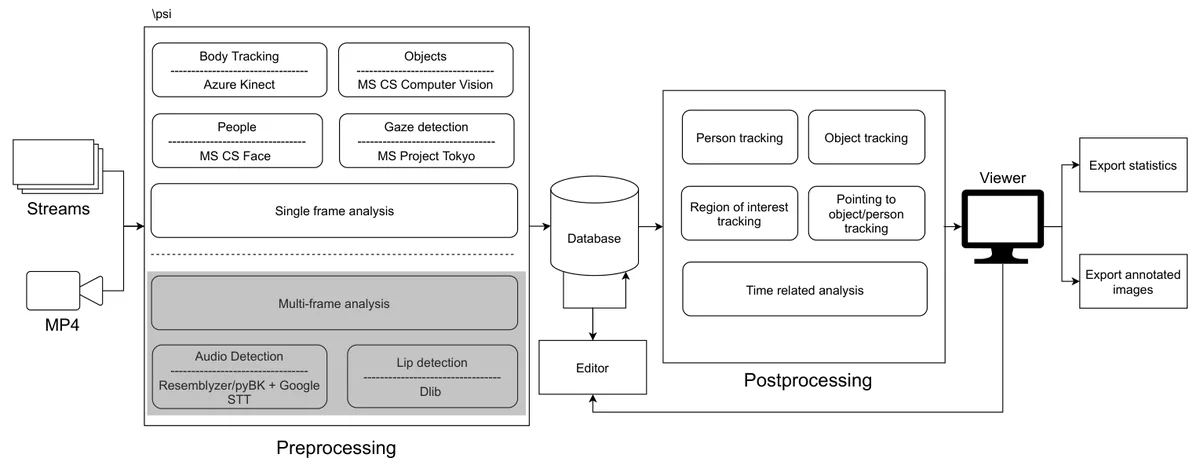
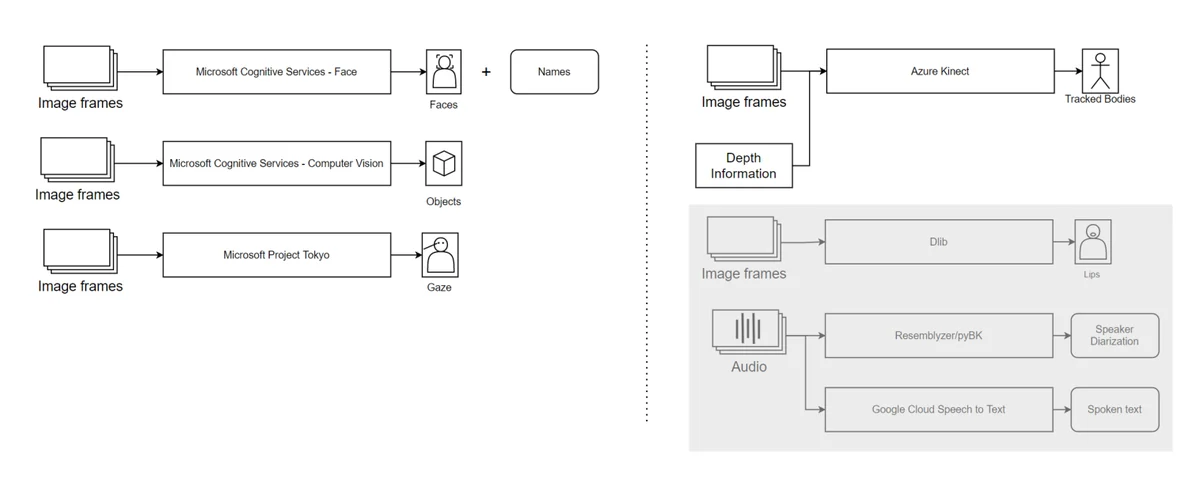
- ACACIA (AI Chain for Augmented Collaborative Interaction Analysis), a Windows desktop application for researchers. The researcher loads a study recording (an MP4 file, or an Azure Kinect stream that adds depth), registers each participant with a name and a profile image, and lets the system take a first pass. The system identifies people in every frame, detects objects, estimates where each person is looking, and tracks people across frames by binding faces to bodies. In an editor, the researcher adds, moves or deletes people and objects and draws regions of interest by hand. A viewer overlays names, objects and gaze paths on each frame and exports tables of who looked at or interacted with whom or what, frame by frame. It chains Microsoft's Platform for Situated Intelligence with Azure Cognitive Services (Face and Computer Vision) and Project Tokyo's gaze model. Its output was compared with human coders' judgements.
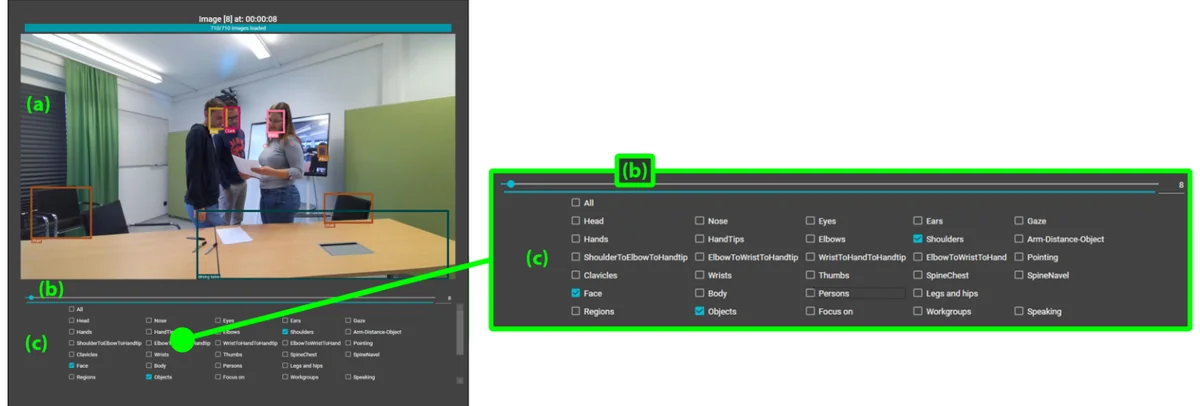
Fig. 5. Left: main area of ACACIA's viewer. Right: call-out of frame control bar (top) and visualization options (bottom). (a) marks the visualization pane showing the selected visualizations on the current frame, (b) the frame control bar allows navigating the video frames, and (c) shows a list of visualization options to choose from. Please note that some options (e.g., Speaking or Workgroups) are experimental and have not been evaluated, yet. From the paper, Figure 5, p. 10. - Setting
- Hybrid collaboration: two participants in one room linked to three in another via Microsoft Surface Hub 2S devices, solving logic puzzles, and one Azure Kinect camera per room.
- Participants / data
- Five university staff who were not authors (two professors and three research associates).
- Duration
- Around 60 minutes of collaborative interaction data (30 minutes per room). Detailed evaluation of a 3.5 minute segment (211 frames) and a 2-minute sample (120 frames).
- Analysis
- Frame-by-frame judgement of person identification, object recognition and gaze targets against human coders' impressions, with ambiguous cases discussed by the research team.
Findings
People are found when they're visible. In recordings of a five-person hybrid puzzle-solving session, the tool recognised and identified people very reliably whenever the camera had a clear view of them. It did so even when they faced away, by tracking which face belongs to which body. #
(§5.1, p. 21)Hidden people are lost. The main failure was occlusion. A participant sitting behind another was recognised in fewer than half the frames of the evaluated segment. #
“In our tests we mostly lost track of persons only when they were currently not visible”
Remote faces on screen count too. With a single camera in the room, pointed towards the large screen showing the remote participants, the tool identified most participants, in the room or on screen, whose faces were visible. #
(§4.3, p. 16)Objects needed a human hand. Automatic object detection was too broad and unstable to use, so researchers marked the regions that mattered by hand, which took only minutes. #
“we invested a few minutes to add several regions of interest: a printed-out worksheet, the area of the Surface Hub showing the whiteboard application, and the area of the Surface Hub showing the remote participants”
Gaze is hit and miss. Estimating where each person was looking found the right target only part of the time, depending on how much the person faced the camera. #
(§5.1, p. 21)Half-way there. Automated analysis of collaboration video cannot yet replace what human coders do, and better camera placement is the main step still needed. #
“judging from our systematic evaluation, we estimate that we are half-way there. Our evaluation showed that the biggest remaining issue is how to achieve optimal camera perspectives.”
Questions this paper answers
- Can AI automatically code video of people collaborating?
- Partly. An AI pipeline identified people reliably when the camera could see them. But object detection and gaze estimation were not yet reliable enough, and regions of interest had to be marked by hand. We estimate we are half-way there. (See §5.1, p. 21; §4.4, p. 19; §5.1, p. 21; §6, p. 23.)
- How accurate is AI gaze tracking from a single camera for research video?
- Not yet accurate enough to use directly. Gaze landed on the correct target in 60.2% of the frames in which one participant, who often faced the camera, was recognised, and 33.7% for one mostly facing away. We think depth information and front-facing angles help. (See §5.1, p. 21.)
- What is the biggest obstacle to automated analysis of group video?
- Camera perspective. People hidden behind others drop out of the analysis, and gaze estimation works only when faces are turned towards the camera. We judged this the biggest remaining issue. (See §4.4, p. 18; §6, p. 23.)
- Can AI identify remote meeting participants shown on a screen in recorded video?
- To some extent. Using one camera pointed towards the screen showing the remote participants, 61.47% of all participants, remote or in the room, were identified correctly as long as their faces were visible. We see this as a good starting point. (See §4.3, p. 16.)
Quantitative results
| Measure | Result | Where |
|---|---|---|
| Frames in which the occluded participant was recognised | 93 of the 211 frames (44.08%) | §4.3, p. 16 |
| In-room and remote participants identified when faces visible | 61.47% | §4.3, p. 16 |
| Table recognised in a 120-frame sample | 81 of the frames (67.5%) | §4.3, p. 17 |
| Correct gaze target: participant often facing the camera; participant mostly facing away | 56 of the 93 frames (60.2%); 71 frames (33.7%) | §4.4, p. 19 |
Contributions and implications
- Do not replace human analysts. Interweave human and machine effort, because automated systems carry biases and rare cases are hard for data-driven AI.
Thus, we argue for interweaving human as well as machine efforts in the research process related to analysis of collaborative interaction.
(§6, p. 23) - Use several cameras per room, with synchronisation based on robust confidence ratings, and a depth camera with high-resolution, front-facing imagery for gaze.
we think a combination of highresolution 2D imagery, depth information, and a front-facing camera angle is best for reliable gaze estimation
(§5.1, p. 21) - Controlled lab studies are a better first use than field studies with crowds.
controlled lab studies are a more favorable first candidate for real-world application of such a system as opposed to field studies in classrooms or museums
(§6, p. 23) - Protect privacy by never using real names for profile images, informing participants and seeking consent, and limiting use to scientific studies.
Limitations
- The evaluation was small-scale, with five participants and judgements on short segments. Results depend heavily on the hardware and services used.
- The tool cannot yet reliably detect fine-grained collaboration elements such as coupling styles.
at the moment we cannot reliably detect and distinguish between fine-grained elements of a collaboration such as coupling styles
(§6, p. 24) - Hardware calibration matters, because depth and colour images did not always cover the same area.
- Pointing, lip and speech detection were not mature enough to evaluate.
›Concepts
- ACACIA
- AI Chain for Augmented Collaborative Interaction Analysis: our desktop tool that combines machine perception services to analyse study video.
In ACACIA, machine perception takes a first pass at time-consuming steps in the coding process that are easy for machines to solve but hard for people to do reliably over a large data set
(§1, p. 3) - Machine-in-the-loop
- Machine perception assists human researchers, rather than humans checking a machine.
a "machine-in-the-loop" inversion of the "human-in-the-loop" concept
(§1, p. 3) - Entities and relationships
- Active entities (people) and passive ones (objects, regions), and who interacts with what or whom over time.
it is essential to find out who (i.e., which active entity) was interacting with what (i.e., which passive entity) or whom (i.e., which other active entity) at which point in time
(§3.1, p. 7) - Regions of interest
- Areas specific to a study, such as part of a table or a screen, which researchers annotate by hand because they cannot be detected automatically.
Regions are objects or areas in frames which are of particular interest to the observers.
(§3.3, p. 12)
Figures
How to cite
Thomas Neumayr, Mirjam Augstein, Johannes Schönböck, Sean Rintel, Helmut Leeb, and Thomas Teichmeister. 2022. Semi-Automated Analysis of Collaborative Interaction: Are We There Yet?. ISS 2022. https://doi.org/10.1145/3567724
This brief was prepared with AI assistance and published by Sean Rintel. It is not the authors' published text. Page numbers refer to this PDF.