Research brief
Takeaway: Collaborative software can become malleable by remembering how work happened. When every voice, video and edit leaves a trace that AI can query, history becomes working material. Teams could build tools mid-meeting, like replaying talk behind a spreadsheet edit or catching up a returning colleague.
Why this matters
- What was known
- Most software treats activity history as an afterthought, and AI meeting tools work on single modalities such as transcripts, detached from what is happening in the shared workspace.
Existing AI-assisted meeting systems-commercial or research-operate on single modalities or treat AI as a conversational layer detached fromworkspace state.
(§2.2, p. 3) - What this paper adds
- Rather than adding another AI assistant beside the workspace, we make the workspace's whole recorded history part of the medium, building on the theory of interaction substrates. We demonstrate this with a working system and a five-part scenario.
This accumulation of content, context, and bespoke capability growing together in AI-mediated substrates is, we argue, what distinguishes AECWs from existing collaborative tools
(§5.6, p. 8) - Who it matters to
- Researchers and designers of collaborative, malleable and AI-enabled software, and teams who meet and work together remotely. The paper also flags the privacy and surveillance stakes for participants.
We see Stund as an experimental platform that enables research to explore these tensions empirically
(§7.3, p. 11)
Research questions
- How can collaborative workspaces make activity history (voice, video, interactions and content edits) a first-class resource that collaborators can query and build on during their work?
- What becomes possible when AI is embedded in the workspace medium, rather than acting as a separate assistant, to turn activity traces into bespoke instruments?
Method and data
- Design
- Systems contribution: a conceptual model, a functional implementation, and a five-part use scenario demonstrating its capabilities (no user study).
- Prototype
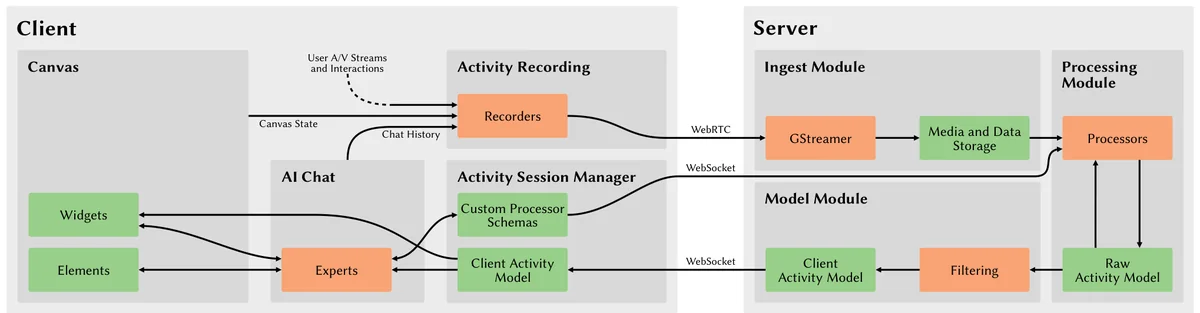
- Stund, a web-based shared infinite canvas (built on Webstrates, Codestrates and the tldraw canvas) holding live video feeds, sticky notes, documents and shapes, with an AI chat sidebar. As people talk and work, Stund records their audio, video, canvas actions and chats as time-stamped traces on a Java server and transcribes speech automatically. Users can select items and ask the chat about past activity ('What did this mean?') or have it arrange content. They can also have it write 'processors' that derive new traces (for example, detecting a shaken note or someone leaving the camera) and 'widgets' (small interactive tools on the canvas such as a note counter or a catch-up summary). Widgets can be shared and recombined through a repository. The chat passes requests to specialised AI 'experts', which can use different models, such as frontier models for writing code. There was no comparison in a study. A table contrasts Stund's capabilities with those of a basic chatbot given transcripts and interaction logs.
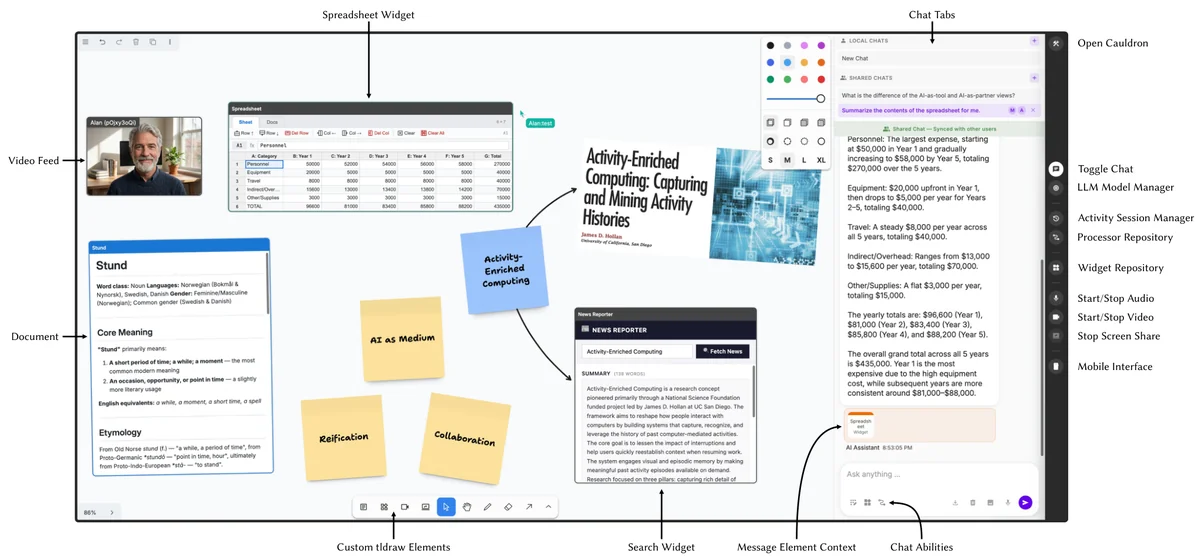
Figure 2: Stund Interface. The interface is structured around a shared canvas and a chat sidebar. Custom elements, including documents, widgets, and video feeds, can be placed along regular elements (here notes, images, arrows, shared cursors) in the canvas (paper cover image by [31]). The chat supports multiple tabs-local or shared-where shared tabs show presence indicators and can be collaboratively authored. Chat messages can include elements or images in their context. Here, the chat summarizes the contents of the spreadsheet widget, with its reply displayed in the context of that element. The chat has toggles to activate the write-access abilities: canvas, widget, and processor. A sidebar on the right gives access to control panels for model selection, repository dialogues, and buttons to start or stop media streams. From the paper, Fig. 2, p. 5. - Setting
- Remote collaboration on a shared online canvas with audio and video. The scenario follows a team writing a grant proposal over a day.
- Participants / data
- Scenario of three remote collaborators (Anna, Bo and Carl) writing a grant proposal over a day. The authors also used Stund in their own meetings and other domains.
- Analysis
- Demonstration of capabilities through the scenario, a capabilities overview comparing Stund's components with a basic LLM chatbot baseline (Table 1), and informal testing of models and costs.
Findings
Asking why a note exists. In our scenario, three remote collaborators writing a grant proposal selected a sticky note nobody could explain and asked the system what it meant. It found the conversation in which the note was made, which we know of no current system doing. #
“the system responds that they made a reference to the zoning colors in the classic computer game SimCity (1989) when talking about mixed residential and commercial neighborhoods”
Inventing new awareness on the spot. In our scenario, one collaborator had the AI build a detector for a team habit during a coffee break, along with a widget listing what it caught. This is a new kind of activity awareness defined by the team itself. #
“Bo notices that they tend to shake sticky notes for emphasis.”
Catch-up tools built live. When a collaborator caring for a sick child asked what he had missed, a colleague had the AI build a widget that summarises the last few minutes of talk and activity. It was assembled from live recordings rather than after the meeting. #
“Carl suggests extending the widget to also rely on activity traces from a video processor to detect when someone has stepped away from the camera and automatically adjust the summary duration.”
Tools that recombine. Widgets could be shared, reused and combined. In our scenario, the team linked a spreadsheet's edit history to the conversation at the time of each edit, with playback of the voice recording. #
“they realize that they cannot remember why the operating budget was lower in year three”
Writing tools needs big models. In our informal use, smaller AI models handled most organising and summarising, but writing widget code ran smoothly only with a frontier model, and an open-source model needed more iteration. #
“When we have used frontier models such as Claude Opus 4.6 for developing widgets, the token cost could reach several USD per widget.”
Awareness or surveillance. The activity traces that make past work useful can also enable surveillance. What matters is who controls what is captured, and why. #
“One cannot know how past actions may be reinterpreted by a processor that does not yet exist.”
Questions this paper answers
- Can AI explain why something is on a shared whiteboard?
- It can, if the workspace records what was said as well as what was edited. AI can then find when a note was made, retrieve the talk around that moment and explain it. A chatbot given only transcripts might answer too, but without the link back to the note. (See §5.1, p. 6.)
- Can people build their own meeting tools during a meeting with AI?
- In principle. In a demonstration scenario, collaborators ask the workspace's AI chat to write small tools on the shared canvas. Examples are a note counter, a detector for a team habit and a catch-up summary, which they then reuse and combine. Whether real teams can do this is untested. (See §5.2, p. 6; §5.3, p. 7; §5.4, p. 7.)
- Which AI models are needed to build tools inside a collaborative workspace?
- In informal testing, smaller models handled most organising and summarising, but writing widget code ran smoothly only with a frontier model. An open-source model could get similar results with more iteration. (See §7.2, p. 10.)
- Is recording everything in a shared workspace a privacy risk?
- Yes. The activity history that makes past work useful can also enable surveillance, and past actions could be reinterpreted by analyses that do not yet exist. Monitoring that workers control may constrain them less than imposed monitoring. Letting individuals switch off their own recording may partly help. (See §7.3, pp. 10–11.)
Quantitative results
| Measure | Result | Where |
|---|---|---|
| Cost of simple retrieval queries with Claude Sonnet 4.6 | usually less than 0.05 USD each | §7.2, p. 10 |
Contributions and implications
- Treat activity history as a first-class resource in collaborative software, with AI woven into the workspace rather than added as a further silo.
- The conceptual model does not depend on current AI limitations.
is not a workaround for limitations of current AI
(§7.2, p. 10) - Stund may shift who bridges the socio-technical gap, letting users act as designers of their own workspace.
Its malleability may shift the challenge of bridging the socio-technical gap: it is no longer solely the designer's responsibility but also that of the users
(§7.1, p. 9)
Limitations
- No evaluation with users yet.
we have not demonstrated whether such a system is comprehensible to users or provides value in actual collaborative work
(§7.4, p. 11) - Instrumentation is limited to processors and rectangular widgets.
Instrumentation is only possible through processors and widgets confined to rectangles.
(§7.4, p. 11) - Prototype constraints include one session per workspace, nightly flushing of history, minimal sandboxing, and resource-heavy LLM vision processors.
Widgets and processors currently have minimal sandboxing; such security measures would be needed for production.
(§7.4, p. 11) - The canvas and chat give low discoverability of Stund's capabilities.
›Concepts
- Activity-enriched collaborative workspace (AECW)
- Our concept, inspired by Hollan's vision of activity-enriched computing:
computer-mediated collaboration spaces where heterogeneous activity traces from both communication and interaction are captured as part of the workspace
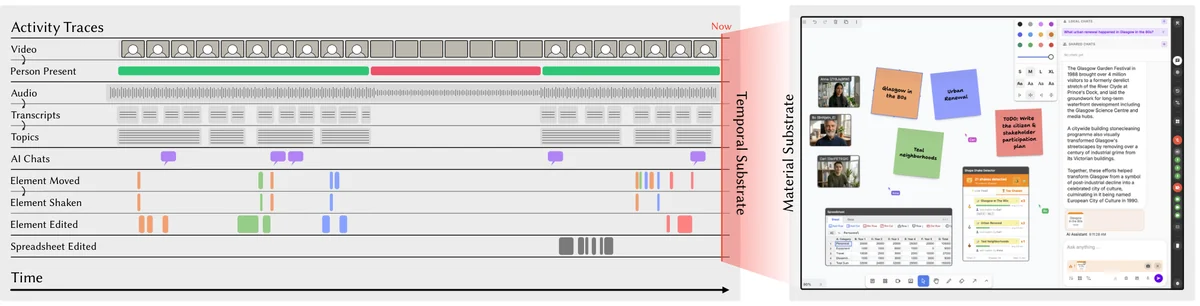
(§1, p. 2) - Material and temporal substrates
- The two substrates of an AECW, after Mackay and Beaudouin-Lafon. The difference between them:
State in the material substrate is mutable, i.e., commands can manipulate it, while activity traces are immutable, making the temporal substrate append-only.
(§3, p. 4) - Reification
- Turning commands and effects into reusable instruments. For example,
the command to create four sticky notes in different colors can be reified into a "create-four-sticky-notes" instrument
(§3.1, p. 4) - AI-as-medium
- AI doing clerical, custodial and creational work inside the workspace, rather than acting as a separate assistant, tool or teammate:
This approach represents an "AI-as-medium" view of integrating generative AI into software, where AI is part of the computational fabric of the workspace
(§1, p. 2)
Figures
How to cite
Marcel Borowski, Janus Bager Kristensen, Payod Panda, Sean Rintel, Niklas Elmqvist, Jens Emil Sloth Grønbæk, and Clemens Nylandsted Klokmose. 2026. Stund: Activity-Enriched Collaborative Workspaces Mediated by Artificial Intelligence. UIST 2026.
This brief was prepared with AI assistance and published by Sean Rintel. It is not the authors' published text. Page numbers refer to this PDF.