Sean Rintel
Sean Rintel Senior Principal Research Manager, Microsoft Research · Brisbane, Australia

Collaboration is a
social practice,
not a feature set

I study what people actually do when they work together through technology, and design systems around that reality rather than assumptions about it.

105+ Publications
4,745 Citations
12 US Patents
Hackathon Wins
Best Paper Awards
Research Vision

The richness of collaboration technology lies in its adaptability to purpose, not its fidelity to reality.

That applies equally to AI: Frontier AI models will improve to equal or exceed some human capabilities, but the next collaboration frontier will be AI that adapts to human intentionality.

For nearly three decades, I have investigated the through-line of what actually happens when people try to work together through technology, focusing on the social practices they construct rather than the features they use: how they negotiate attention, manage trouble, signal engagement, and build shared understanding.

This question first drew me to study how strangers open conversations on Internet Relay Chat (1997) and how long-distance couples cope with video-calling glitches (2007–2015). It led me to Microsoft Research, where I have studied hybrid meetings, telepresence robots, avatar communication, and the pandemic's impact on meetings.

In recent years, this line has converged on a new challenge: How should Generative AI support human collaboration, without undermining the thinking that makes collaboration valuable?

My research now sits at the intersection of three areas: understanding collaboration as social practice, designing AI-augmented collaboration tools, and protecting human cognition in the age of AI. The practical impact is direct, informing Microsoft Teams features, 12 US patents, and the New Future of Work Report series.

Research Map · 25 Years

Technology frames, but does not determine, social action.

Research timeline showing 105 publications across 11 topics organised into Tools for Thought, Collaboration, and Communication, 1997–2026
105 publications across eleven topics, 1997–2026.

Communication

Before you can design for collaboration, you need to understand how people actually interact.

From IRC to Videocalling

People orient to the expressive possibilities of technology.

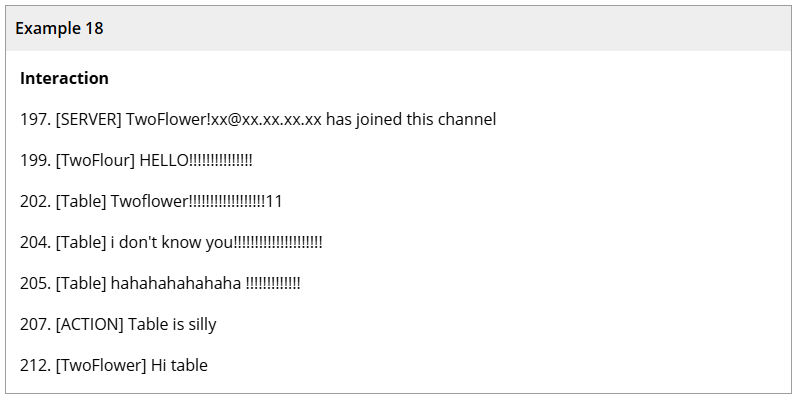
My earliest research, studying how strangers manage interaction on Internet Relay Chat (Human Communication Research, 1997), established an approach I have applied ever since: close analysis of how people actually interact through technology, rather than how they say they do.

This conversation-analytic method revealed that even in the simplest text-based chat, people construct sophisticated social practices: openings, turn-taking, and recovery from ambiguous silences. These are not features of the technology but human achievements accomplished through the technology.

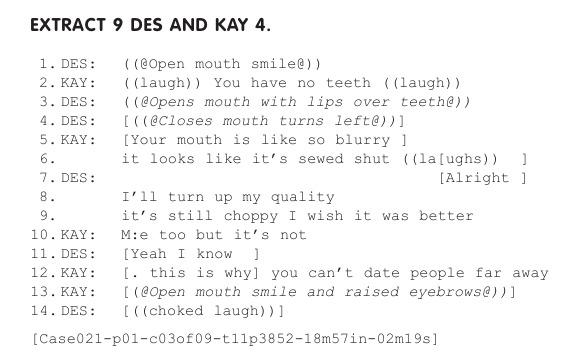
The same method revealed how long-distance couples opportunistically use video-calling glitches as relational resources, how domestic soundscapes can be instrumentalised for ambient awareness, and how membership categorisation works as embodied social action.

IRC conversation analysis extract Video-calling conversation analysis extract
Close analysis of interaction, from IRC text (1997) to video-calling couples (2010–2015).
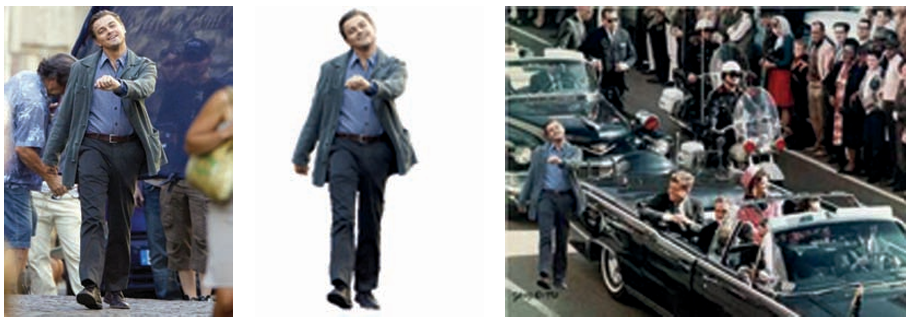
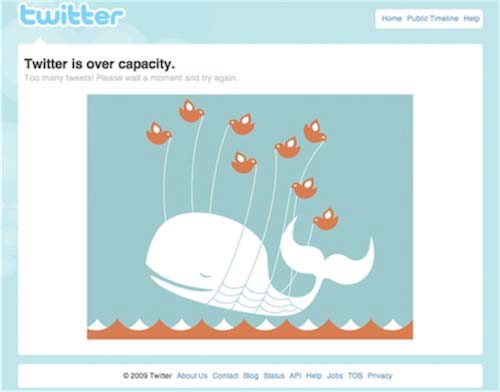
Crisis Memes paper figure Fail Pets paper figure
Crisis memes and fail pets: vernacular genres where people retool templates and brand mascots into expressive, communal resources.
Templates, Mascots, Memes

The same pattern holds beyond one-to-one interaction: people repurpose the expressive affordances of technology to make meaning together.

Crisis Memes (2013) showed that the templatability of image macros is what makes them central to internet culture and freedom of expression: people take a shared visual frame and rework it for their own situation, turning private feeling into public, remixable commentary.

The Evolution of Fail Pets (2012) traced how error screens evolved from terse alerts into whimsical brand mascots — a small design move that turned moments of failure into occasions for empathy, humour, and brand identity.

Across both, the pattern is the same: technology sets the frame, but people decide what the frame means, together.

Design takeaway: study what people do with technology, not just what they say they do. Social practices, not features, are the design unit.

All publications in this area

Collaboration

With that understanding: design systems that support the social reality of collaboration.

Remote & Hybrid Collaboration

Before we can design AI that supports collaboration, we need to understand the social practices that constitute it.

People talk collaboration into being: negotiate attention, manage speaking turns, signal engagement, and express relational bonds.

Across 30+ papers on meetings, hybrid work, and telepresence, the same patterns recur:

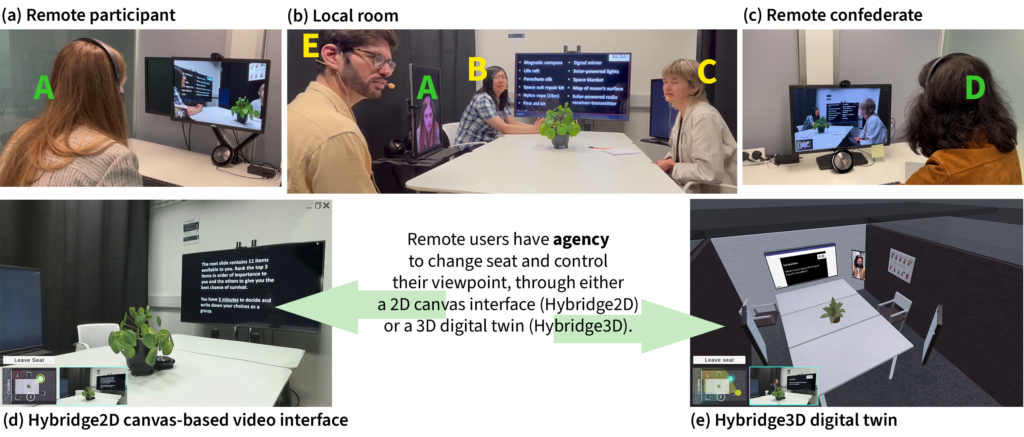
  • Embrace asymmetry in collaboration technologies. In Hybridge (CSCW 2024), giving remote and in-room participants different interfaces (individual displays around the table for in-room, a 3D digital twin with seat-and-viewpoint agency for remotes) closed the co-presence and agency gap that conventional symmetric video calls cannot. Inclusivity comes from tailoring to each endpoint's needs, not from forcing visual sameness.
  • The meeting is not a neutral container. In Meeting (the) Pandemic (CSCW 2022), videoconferencing fatigue was found to arise because tools were designed around steady-state assumptions and a taken-for-granted balance of task and social work. When the rest of the workday collapsed into the meeting, the container broke. Designs must support sociality as well as effectiveness, not assume one is a side-effect of the other.
  • Make space for social time. In Making Space for Social Time (CHIWORK 2022), we showed that traditional videoconferencing skips the conversational transitions (the small talk before, after, and around meetings) that carry collegiality and productivity. The CT-Space prototype used spatial and temporal metaphors, spatial audio, and visible group clustering to restore these transitions without requiring all-day connection. Conversational transitions should be a standard requirement for videoconferencing.
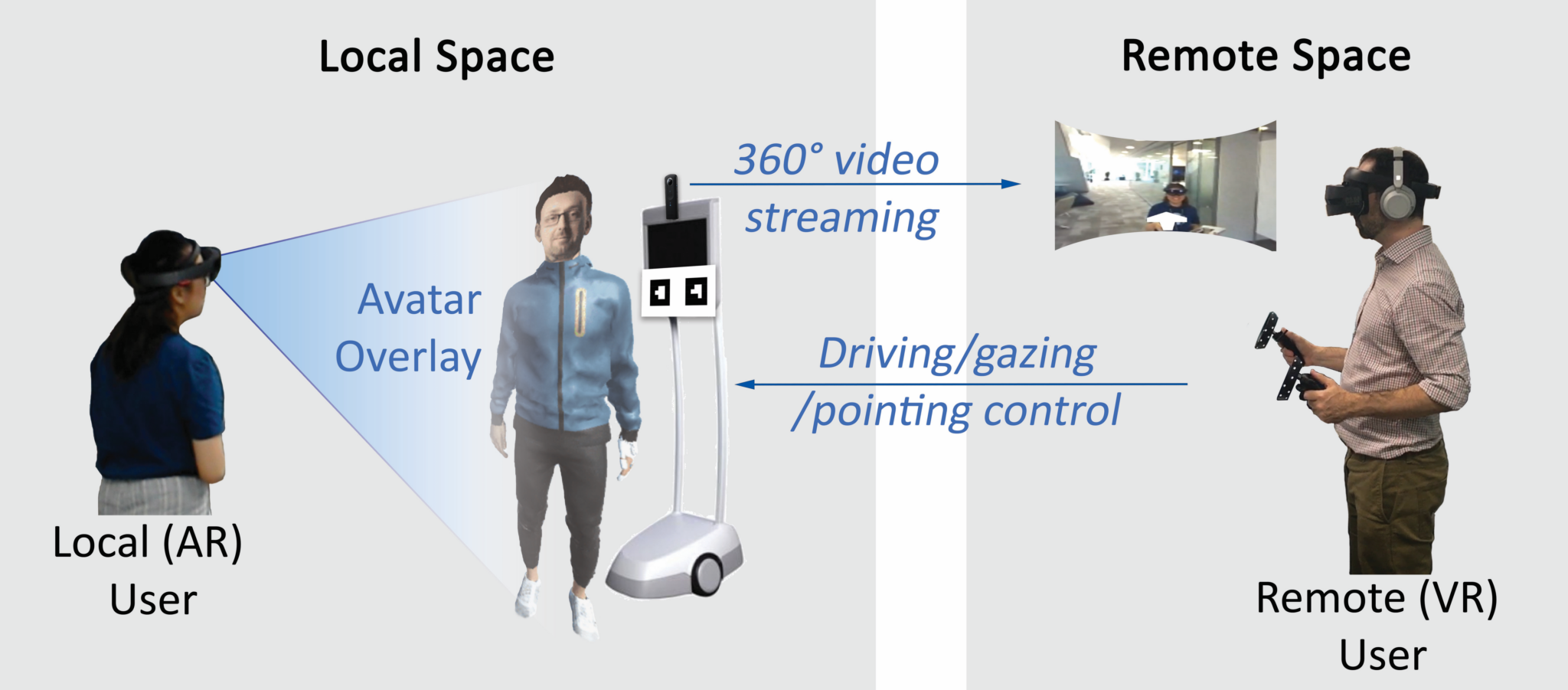
  • Telepresence is as much a social problem as a technical one. A ten-paper program on mobile robotic telepresence at MSR found that workplace adoption fails when robot affordances mismatch workplace social practices. VROOM (CHI 2020) showed that asymmetric mobile robotic telepresence capabilities can enhance the sense of a remote person's belonging to a space.

Design takeaway: meeting design is an ecology problem, not a UX problem. Fix the interplay of tools, spaces, and practices — not individual interfaces.

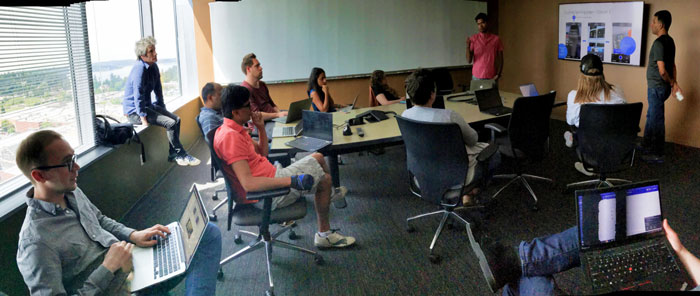
Hybridge: spatial inclusion for remote participants in hybrid meetings Perspectives: inclusive and equitable hybrid meeting experiences CT-Space: conversational transitions before, during, and after video meetings VROOM: virtual robot overlay for online meetings
Hybridge, Perspectives, CT-Space, and VROOM: prototypes that give remotes spatial presence around the table, restore the conversational transitions that meetings normally skip, and give telepresence robots a meeting-grade face.
(Re)Configuring Hybrid Meetings

Meeting design must be meeting-centred, not user-centred.Best Paper

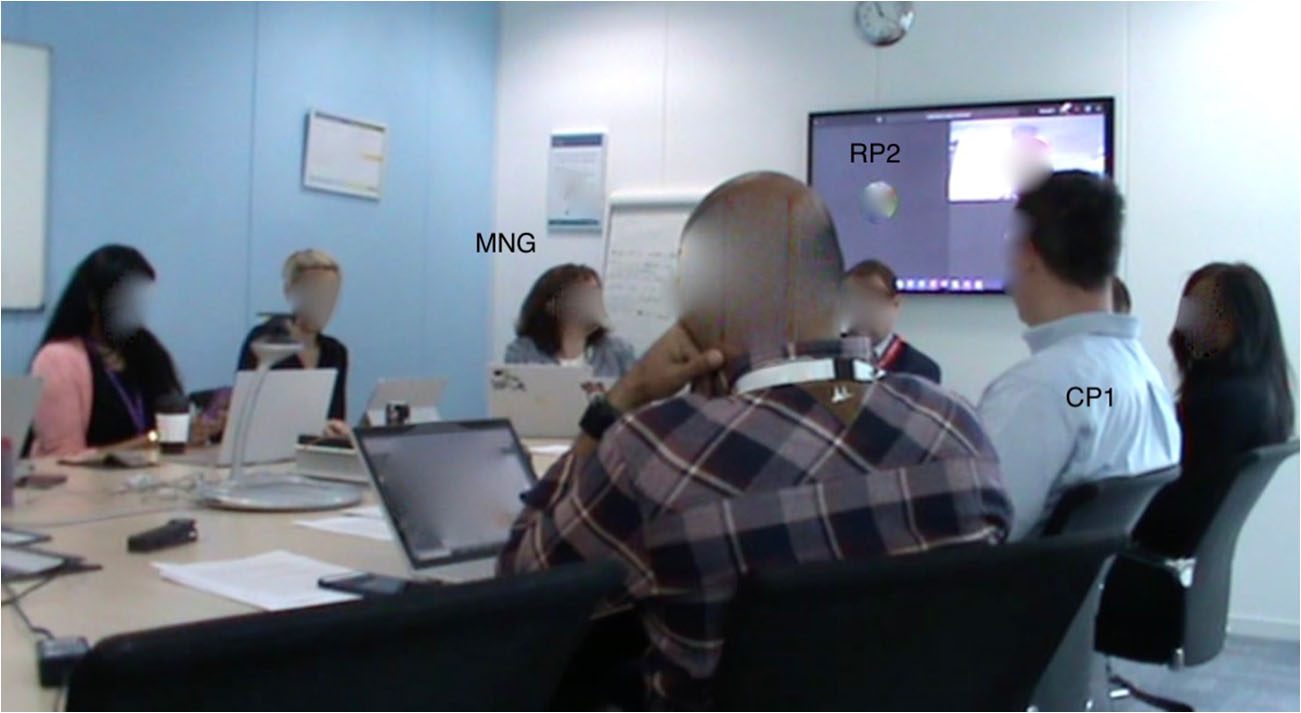
Hybrid meeting breakdowns arise not from individual UX failures but from mismatches in the meeting ecology: the interplay of practices, technologies, and spaces. This reframing shifts design from fixing individual interfaces to supporting the meeting as a whole.

(Re)Configuring Hybrid Meetings · CSCW 2020

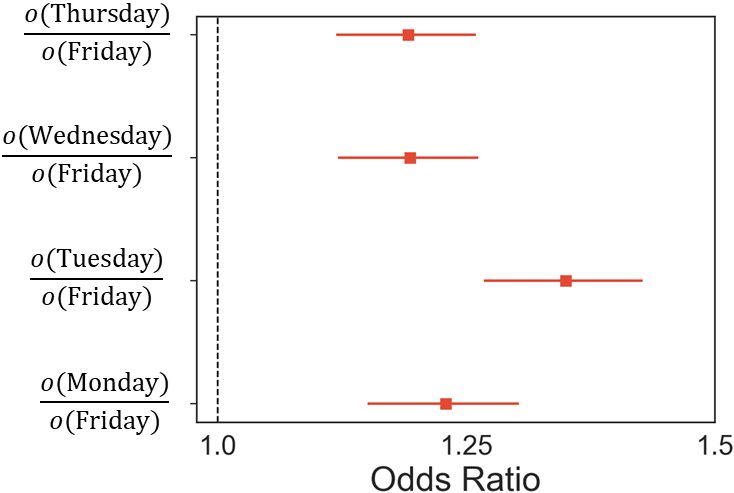
Spatial audio in video meetings

Spatial audio improves turn-taking and social presence.Hon. Mention

In a 75-person experiment, enabling spatial audio led to more equitable turn-taking and higher perceived social presence, because audio spatiality gives listeners the same environmental cues they rely on in person.

Hear We Are · CHIWORK 2023

Multitasking analysis

Multitasking is a feature, not a bug.Hon. Mention

A large-scale analysis of meeting behaviour at a global technology company found that multitasking is pervasive, contextual, and sometimes functional. People switch attention strategically based on meeting relevance, not just distraction.

Large Scale Analysis of Multitasking · CHI 2021

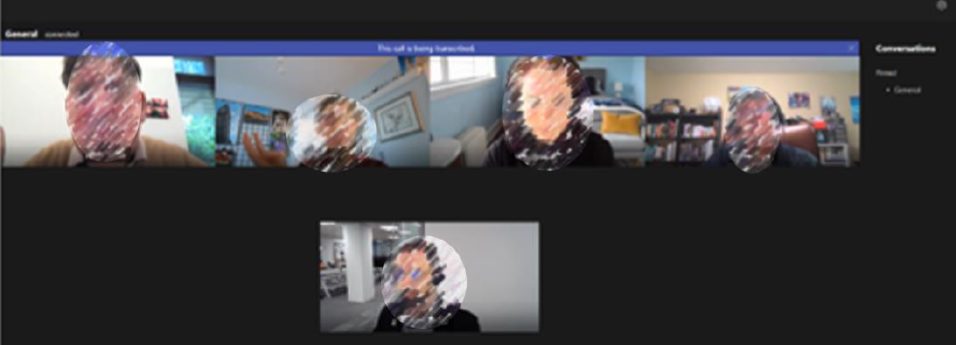
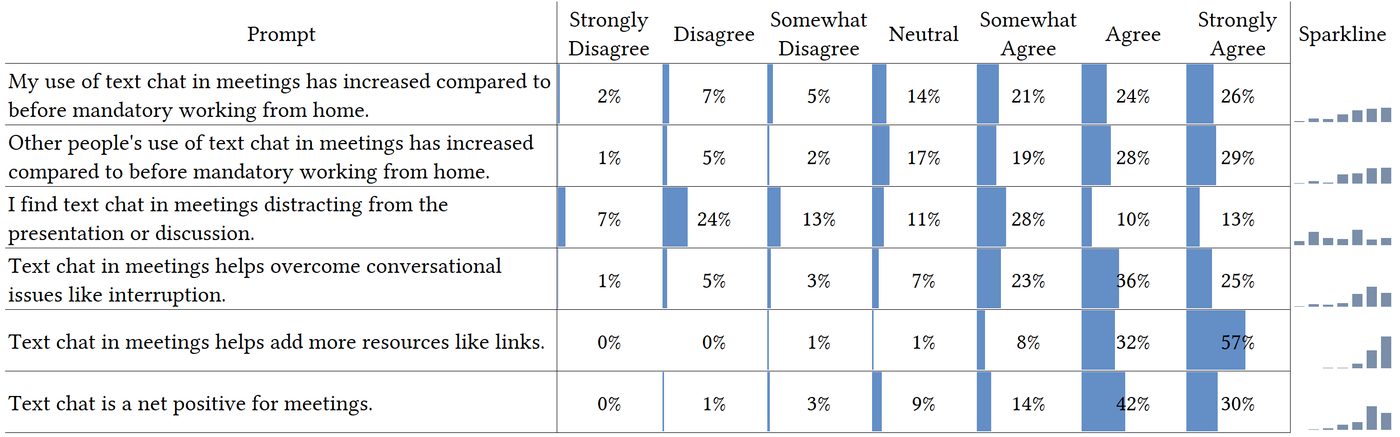
Parallel chat in video meetings

Parallel chat is powerful and perilous.

The text chat alongside video meetings creates a secondary channel that enables inclusion (quiet participants speak up) but also division (side conversations fracture attention).

The Promise and Peril of Parallel Chat · CHI 2021

Avatars & Extended Reality

Realism is not the only axis that matters.

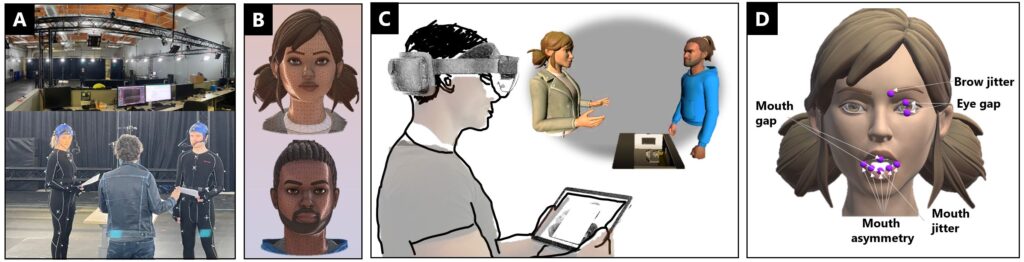
Three studies on avatars and 3D video in meetings show that representation choices shape mood perception, evaluation, and inclusion in ways that pure fidelity does not predict.

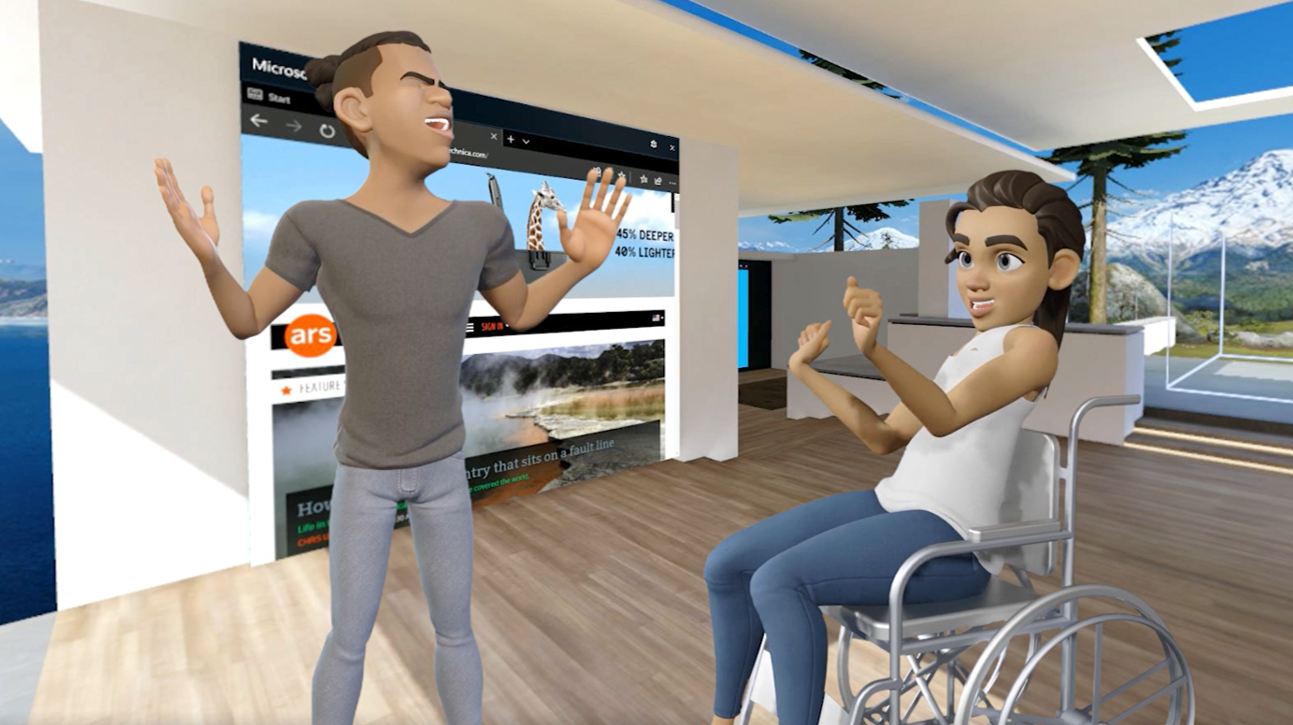
  • Cartoon faces can outperform realistic ones over time. In a two-week HoloLens 2 field study (IJHCS 2025), realistic avatars raised expectations their animation could not meet, producing more mood-perception errors than cartoon avatars; words, tone, and movement mattered more than rendering style.
  • Avatar evaluation depends on ecological validity. In AR experiments with simulated facial-animation noise (ANIVAE 2024), higher ecological validity shifted judgement away from noise parameters and toward empathy and gender biases — so "acceptable" avatar quality cannot be claimed without controlling for Context, Culture, and Character (the Triple C).
  • Spatial 3D video wins attention, loses comfort. An Equal Seat at the Table (CHI EA 2024) placed webcam-derived 3D video of participants in a shared virtual meeting room: attention and co-presence improved over the grid, but the grid still felt more comfortable and professional — familiarity is itself a design constraint.
Avatars in mixed-reality meetings: realistic vs cartoon facial likeness Ecological Validity and the Evaluation of Avatar Facial Animation Noise An Equal Seat at the Table: 3D video in shared spatial context
Realistic vs cartoon avatars in mixed reality (IJHCS 2025); avatar facial-animation noise in AR (ANIVAE 2024); 3D video in a shared virtual meeting room (CHI EA 2024).
All publications in this area
Hybrid meetings & remote work
Telepresence robots
Avatars & extended reality

Tools for Thought

Now the challenge: ensure AI scaffolds the thinking that makes collaboration valuable.

The Problem

The features that make GenAI productive can also erode the thinking that makes work valuable.

Generative AI is transforming knowledge work at unprecedented speed. The central question is what AI should do, not what it can do. My research finds a critical tension: automation, fluency, and speed can erode the critical thinking, metacognition — monitoring your own thinking process — and intentionality that make human work valuable.

The next generation of AI tools must keep humans in the cognitive loop, scaffolding metacognition rather than bypassing it.

Design takeaway: AI interfaces must support verification, uncertainty inspection, and task stewardship — not just speed. Keep the human in the cognitive loop.

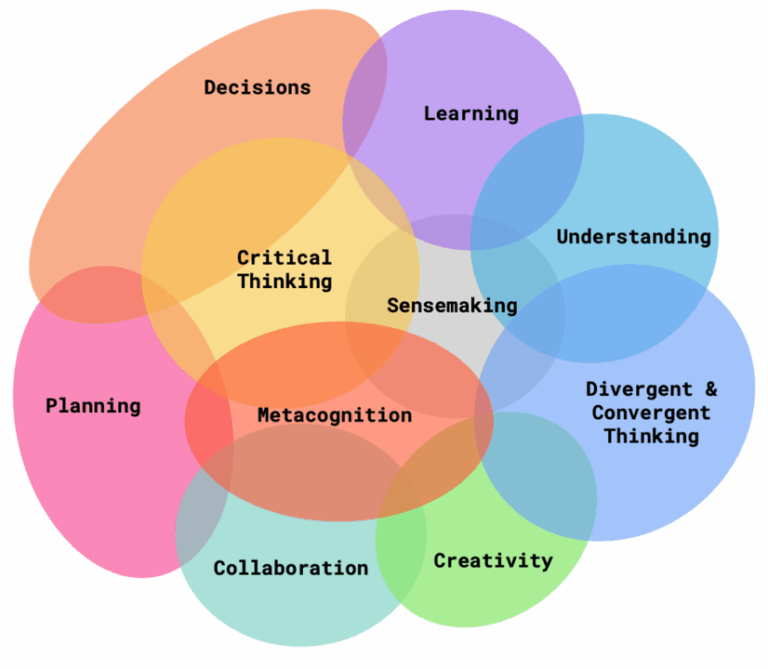
Tools for Thought Venn diagram: Working With Purpose × Thinking By Doing
The Tools for Thought framing: AI that helps us figure out the job as well as do it.
Critical thinking and GenAI study

GenAI reduces critical thinking effort.87K downloads

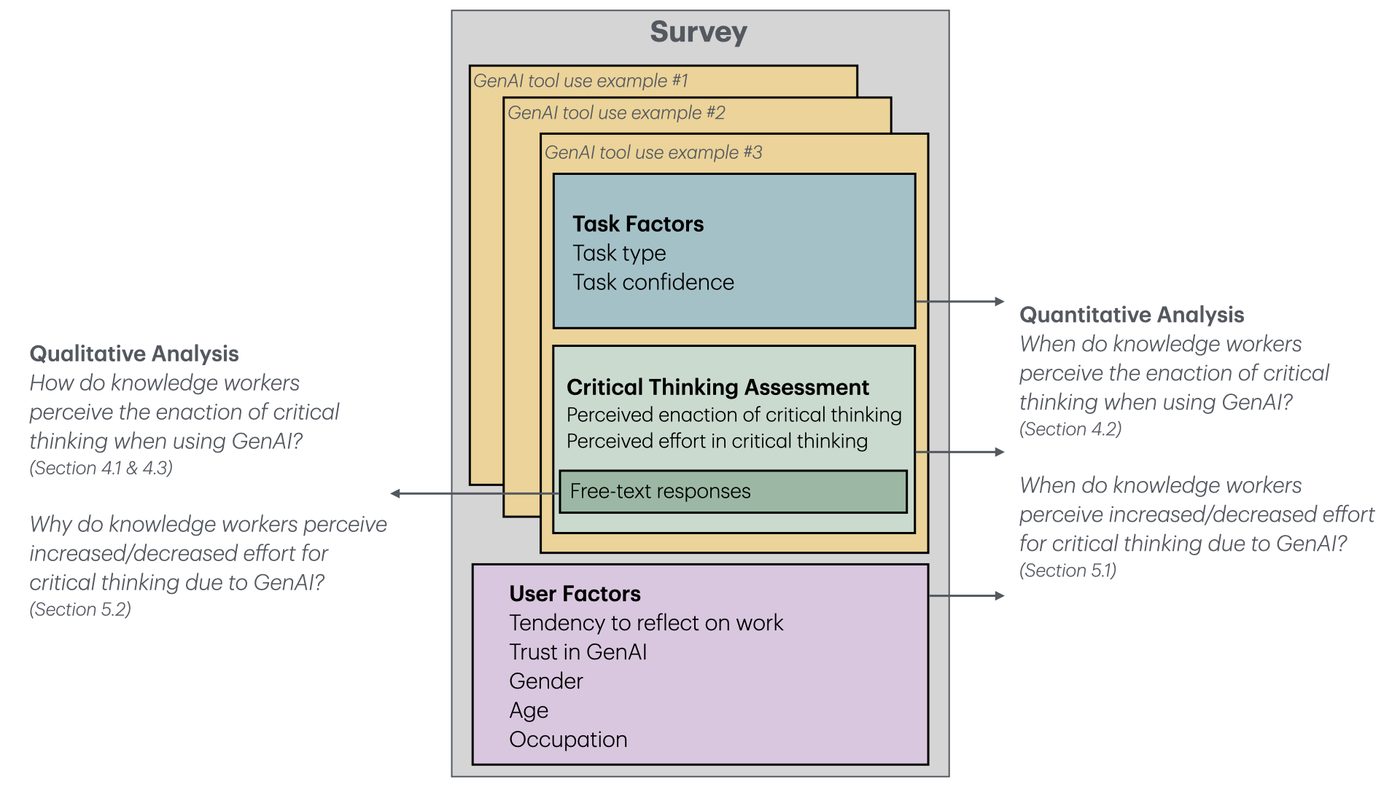
In the 2nd most downloaded paper on the ACM Digital Library, we surveyed 319 knowledge workers and found that higher confidence in GenAI is associated with less critical thinking, while higher self-confidence is associated with more. GenAI shifts critical thinking toward verification and task stewardship rather than generation. Therefore AI interfaces must actively support verification, uncertainty inspection, and stewardship — building in moments to question rather than accelerate past them.

The Impact of Generative AI on Critical Thinking · CHI 2025

Metacognition brain illustration

Metacognition is both the demand and the opportunity.Best Paper

Using GenAI well requires monitoring your own thinking: knowing when to trust AI output and when to question it. This metacognitive load is the hidden cost of GenAI adoption, and also its opportunity. Tools can be designed to scaffold metacognition rather than bypass it. In interface terms: confidence signals before AI responses, mid-task checkpoints, comparison views of alternatives, goal review prompts, and explicit reasoning handoffs.

The Metacognitive Demands and Opportunities of Generative AI · CHI 2024

Ironies of generative AI

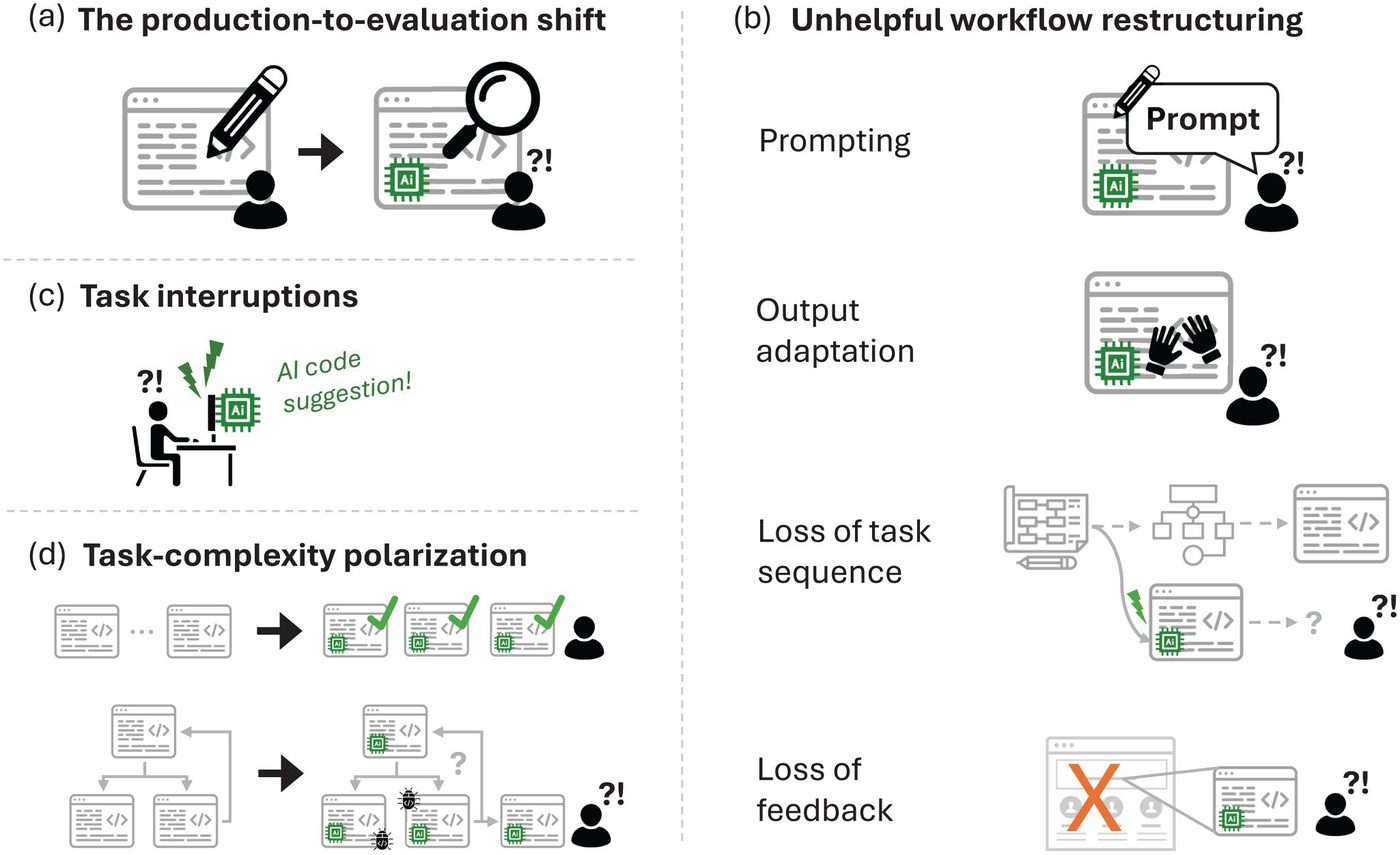
The "ironies" of GenAI parallel classic automation failures.

Drawing on Bainbridge's ironies of automation, we showed that GenAI can reduce productivity through over-reliance, loss of skill, and misalignment between user intent and AI output. The solution lies in better interaction design that keeps humans in the cognitive loop, rather than in more or less AI.

Ironies of Generative AI · IJHCI 2024

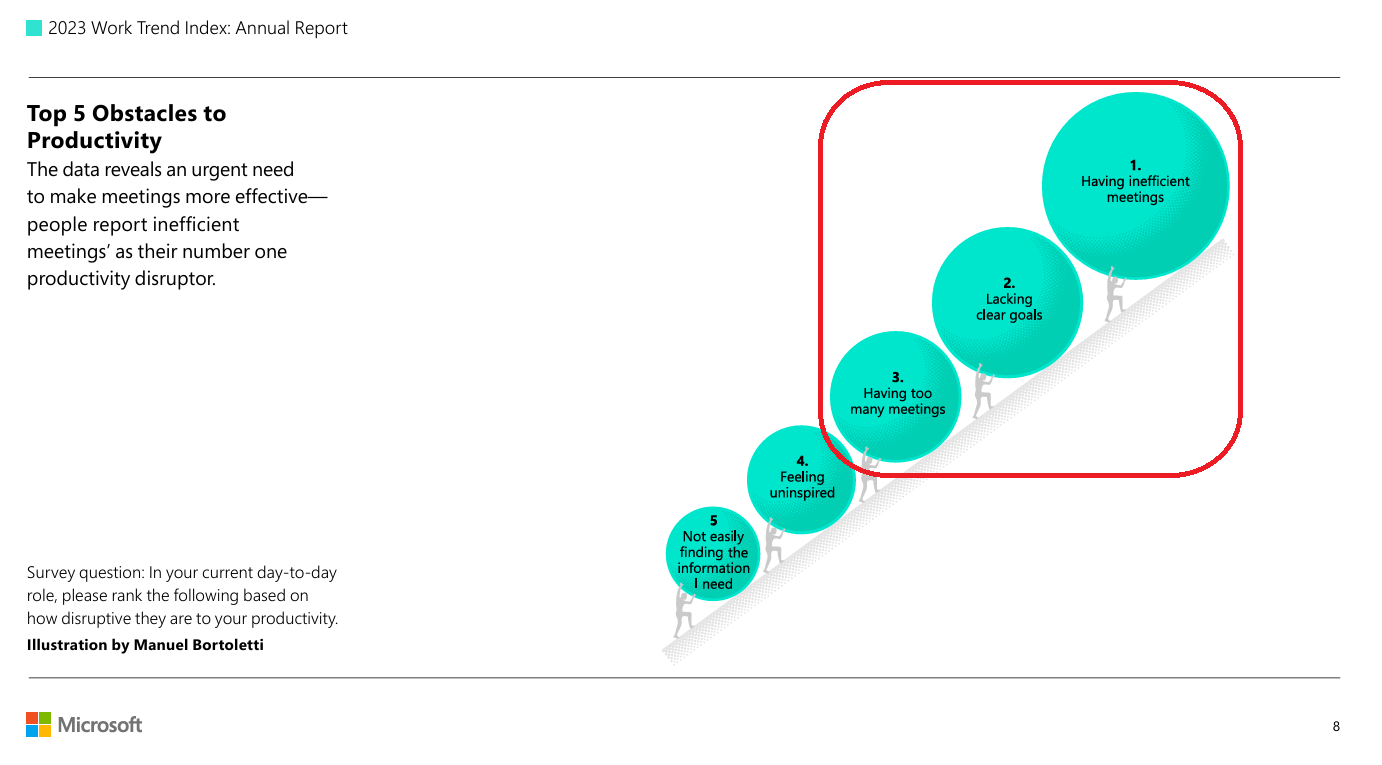
The pervasive problems of ineffective meetings
Lack of intentionality is the persistent meeting problem motivating a research program that follows the meeting lifecycle.
A Proving Ground · Meeting Intentionality

How can Generative AI help people reflect on meeting goals?

Without a solid understanding of why we are meeting, meetings will always be ineffective. Our work on meeting goals is unique in both HCI and Meeting Science, both because of our empirical focus on goals, and because we have now explored all phases of the meeting lifecycle: before, during, and between meetings.

Generative AI is uniquely suited to this problem. Goals are expressed in natural language, they are ambiguous, and they evolve as work unfolds. These are exactly the conditions that rule-based meeting tools have always failed to handle. We argue GenAI helps in three ways: it can elicit tacit goals by asking the questions organisers rarely ask themselves; it can scaffold reflection at moments when people are most able to act on it (before, during, and between sessions); and it can maintain continuity by carrying intent across the meeting lifecycle, so that goals accumulate rather than evaporate. The risk, of course, is that the same fluency that surfaces intent can also substitute for it, which is why our designs treat GenAI as a prompt for human thinking, not a replacement for it.

Crucially, explicitly expressed goals create both direct value for users (clearer plans, sharper meetings, better follow-through) and added value through an AI flywheel. As generative AI shifts human work toward planning and orchestration, externalised reflections become structured inputs for AI collaboration systems. Human reflection generates intent-rich data that improves AI assistance, which in turn reduces the cognitive burden of maintaining intentionality and yields artifacts that make all future collaboration more effective, reinforcing continued reflection.

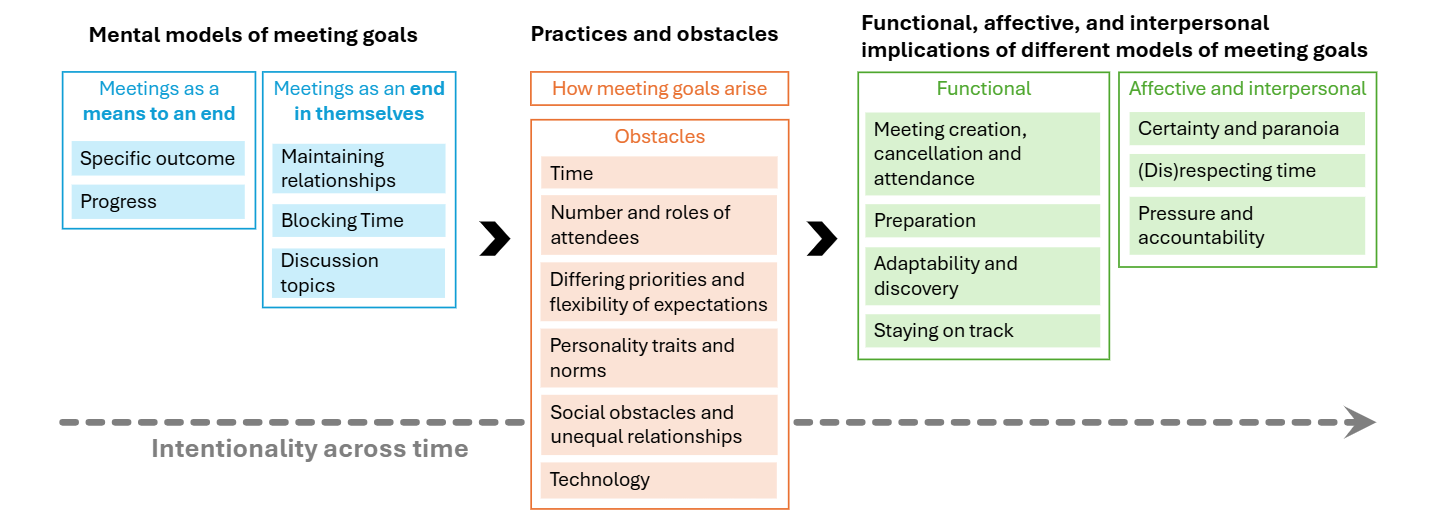
Mental models of meeting goals

Foundations · Mental Models of Meeting Goals

The formative study underpinning the program: how organisers and participants mentally model meeting goals, and what intentionality support would have to look like to fit those models.

Mental Models of Meeting Goals: Supporting Intentionality in Meeting Technology · CHI 2024

Field experiment overview: 361 employees, 7196 meetings

Before meetings · Nudging Attention to Workplace Meeting GoalsCHI 2026

A preregistered field experiment with 361 employees across 7,196 real meetings. Even a brief pre-meeting goal-reflection prompt improved self-reported awareness and behaviour.

Nudging Attention to Workplace Meeting Goals · CHI 2026

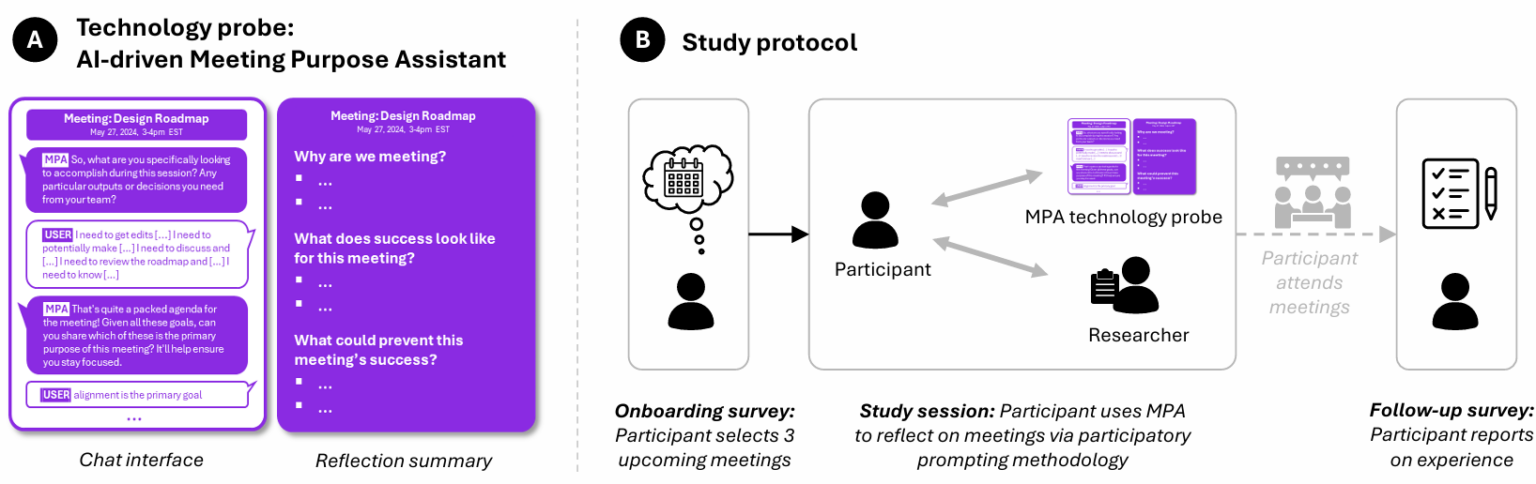
What Does Success Look Like? Prospective reflection prototype

Before meetings · What Does Success Look Like?

An AI-assisted prospective reflection tool that helps organisers articulate success conditions before a meeting begins, catalysing intentionality at the moment plans are still malleable.

Catalyzing Meeting Intentionality with AI-Assisted Prospective Reflection · CHIWORK 2025

CoExplorer adaptive meeting interface

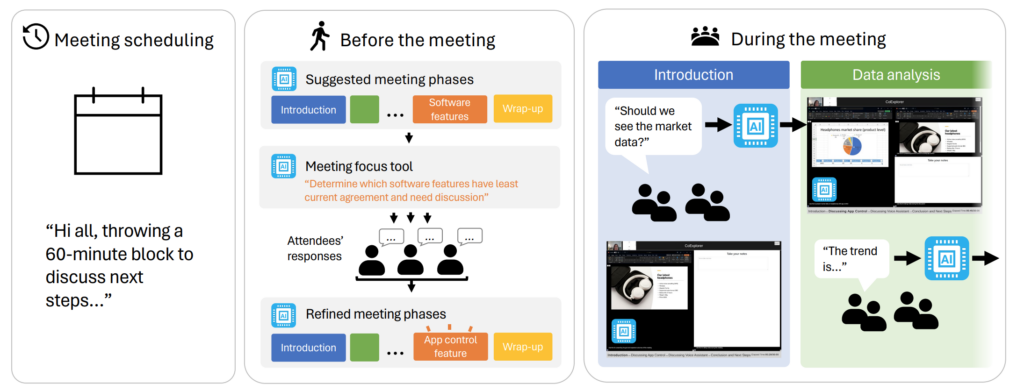
Before & during meetings · CoExplorer

A GenAI-powered adaptive interface technology probe spanning planning and running video meetings. Used as a generative design vehicle to surface what intentionality support could look like across the lifecycle.

The CoExplorer Technology Probe · DIS 2024

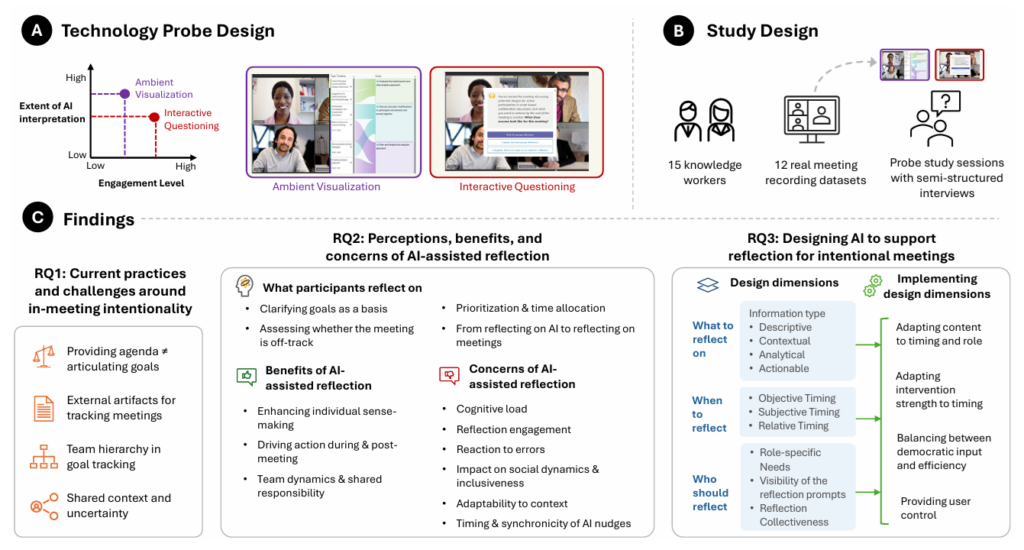
Are We On Track? AI-assisted goal reflection

During meetings · Are We On Track?

Active and passive AI-assisted goal reflection helps participants recalibrate mid-meeting without disrupting flow. Deployed as a technology probe inside Microsoft.

Are We On Track? AI-Assisted Active and Passive Goal Reflection During Meetings · CHI 2025

Chain of intentionality across meetings

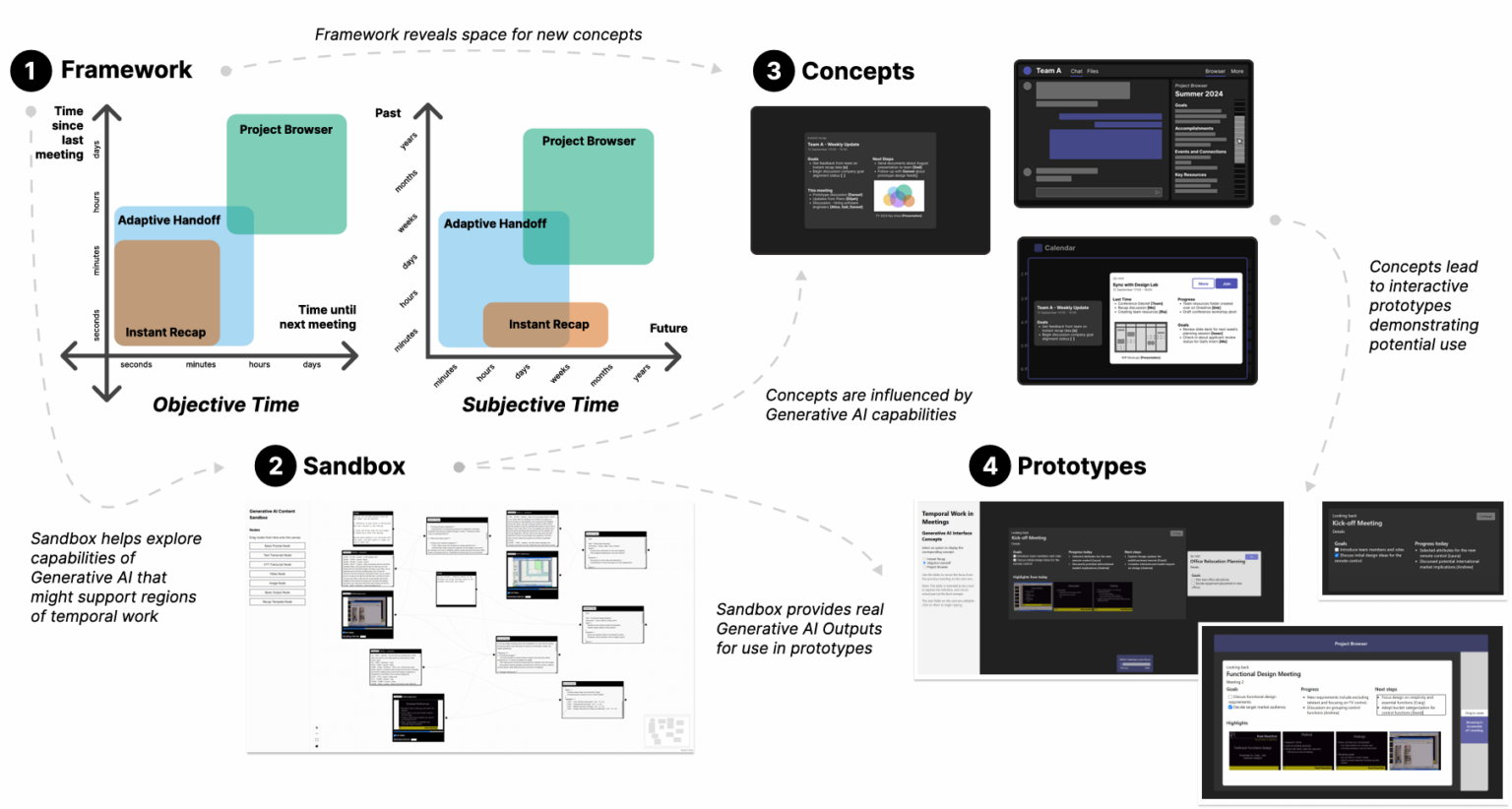
Between meetings · Temporal Work Across Meetings

Interfaces that use Generative AI to scaffold the connective work people do between meetings: tying threads forward, surfacing unresolved goals, and making the gap between sessions productive rather than lost.

Designing Interfaces that Support Temporal Work Across Meetings with Generative AI · DIS 2025

All publications in this area
Meeting intentionality
AI, critical thinking & cognition
New Future of Work reports
Innovation & Translation

Research that reaches products, patents, and practice.

12 US patents · 7 Microsoft Hackathon wins (1 Grand Prize, 5 Firsts, 1 Second).

12 US Patents

These patents and prototypes trace directly from research insights: meeting-centred design → spatial hybrid meeting systems; avatar and telepresence research → personalised animation and companion devices; robotic telepresence → multi-endpoint mixed reality.

Hybrid Meeting Systems

  • Collaborative System: spatial hybrid meetings with avatar-equipped displays and digital twinsgranted 2025
  • Established Perspective UI: spatially consistent seating in video meetingsgranted 2023, 2025
  • Simulated Choral Audio Chatter: crowd audio for virtual event atmosphere2024

Extended Reality & Avatars

  • Multi-endpoint Mixed-Reality Meetingsgranted 2022, 2024
  • Headset Virtual Presence: headset-controlled avatars with emotional expressiongranted 2023
  • Personalized Avatar Animation: few-shot ML model for audio-driven avatar movement2025

Interaction & Input

  • Computing Device Headset Input: headphones as a general-purpose input devicegranted 2023
  • Semantic User Input: context-aware gesture-to-action mapping2023
  • Mixed Reality Workflow Generationgranted 2025

Multi-device Collaboration

  • Companion Devices for Teleconferencegranted 2022
  • Enhanced Joining Techniques: co-located device detectiongranted 2021
  • Proximate Resource Pooling: AV resource sharing across nearby devicesgranted 2017

7× Microsoft Hackathon Winner

Promptions hackathon
2024
Promptly 2nd place

Dynamically-generated UI for AI: everyday, any purpose, anywhere. Now Promptions on AI Foundry Labs.

Inclusive Avatars in Mixed Reality
2021
Inclusive Avatars in MR Grand prize

Teach your avatar to move like you, using few-shot training.

LinkedIn Career Classroom in Microsoft Teams
2019
LinkedIn Career Classroom 1st place

Connecting children from anywhere to career role models.

MILC — Mobile Intelligent Lenses
2019
MILC 1st place

Mobile Intelligent Lenses for everyday Mixed Reality at work.

TACTILES hackathon — tangible cloud intelligence
2017
TACTILES 1st place

Tangible Active Cloud Intelligence: making the cloud a conversation.

Skype Unleashed / Companion Experiences
2015
Skype Unleashed 1st place

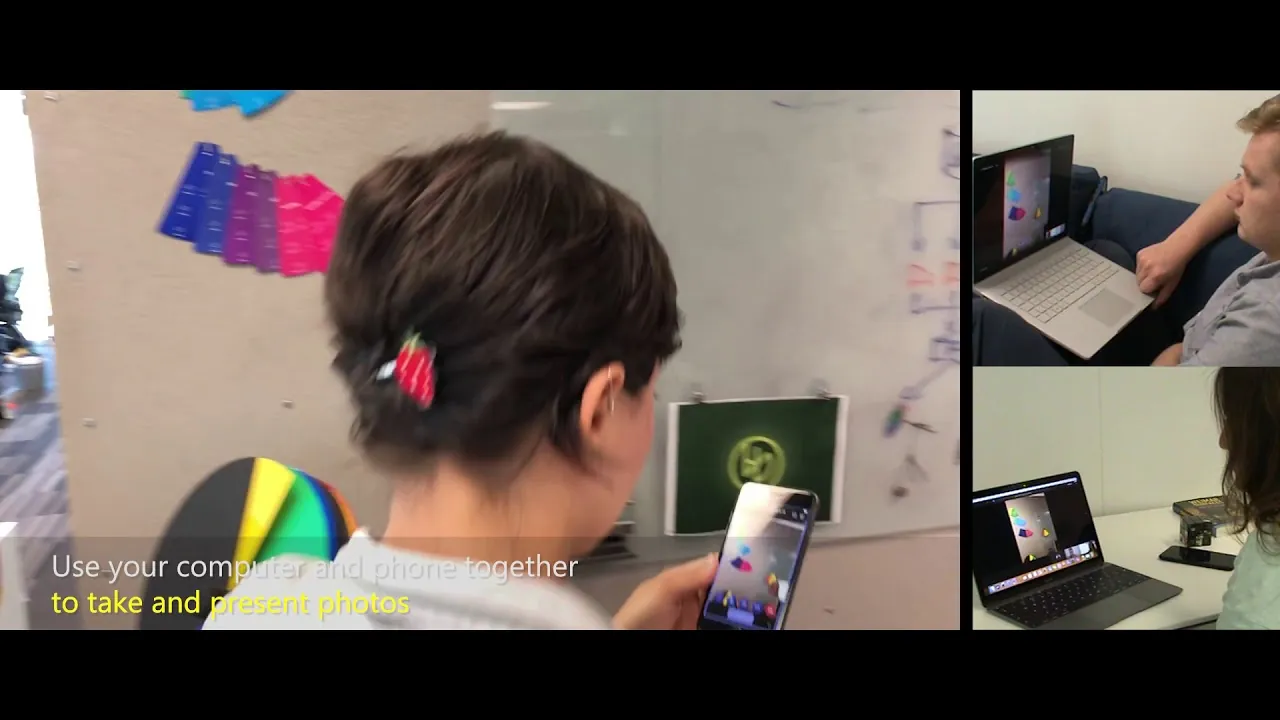
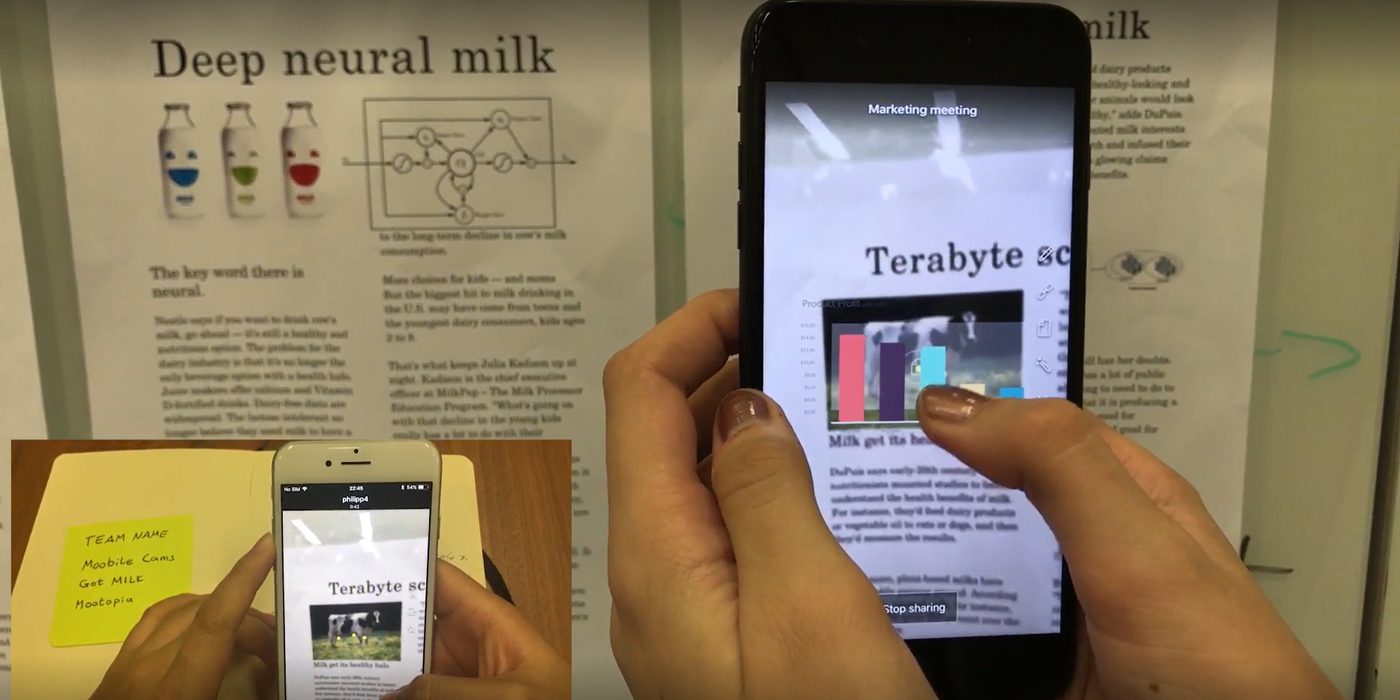
Surface Hub cross-device patch-panel UI. Productized as Companion Mode in Microsoft Teams. Garage Wall of Fame.

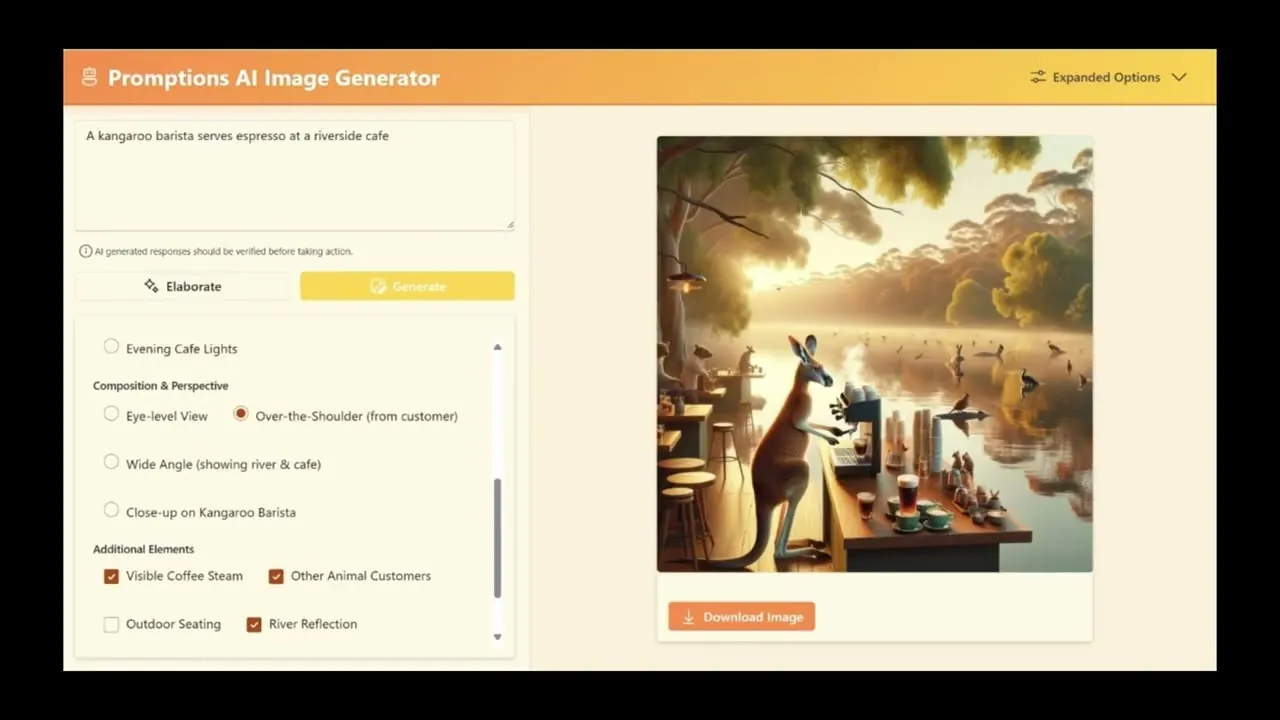
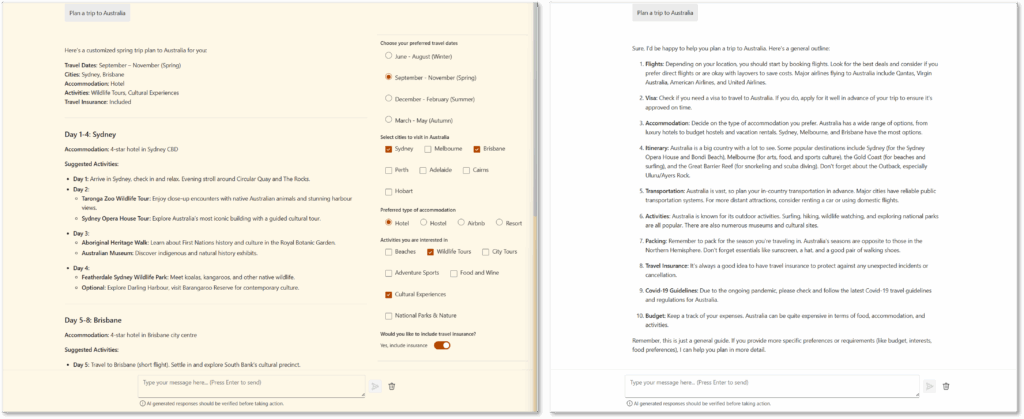
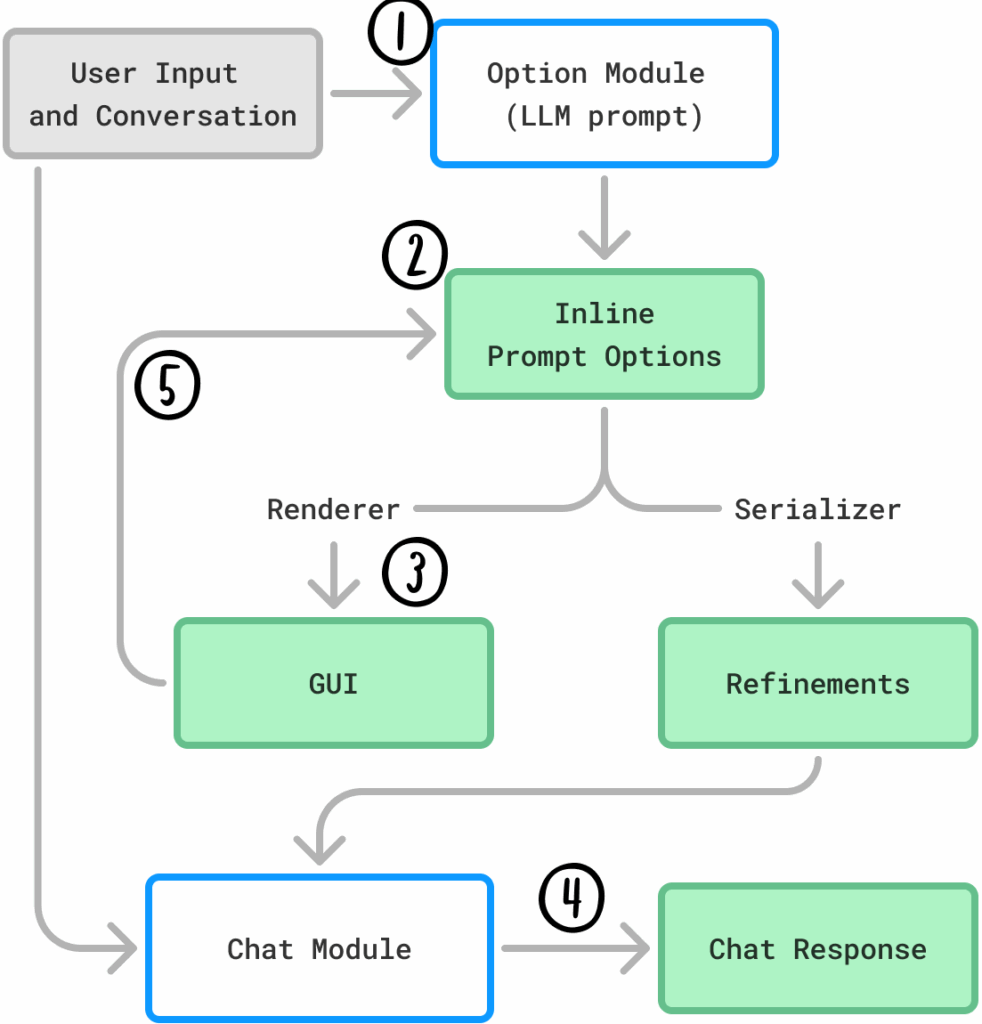
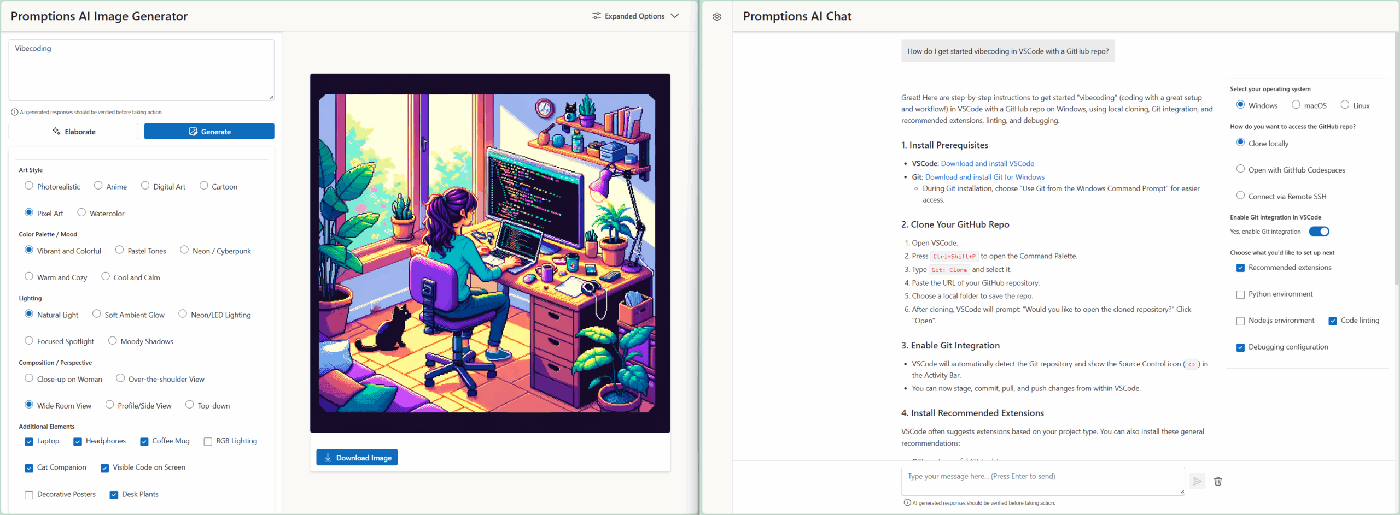
Promptions: dynamically-generated UI for AI
Promptions: dynamically-generated UI elements that let users steer AI in real time.
Open Source · AI Foundry Labs

Promptions: If You’re Building UI for AI, Give Users the Power of Choice

Most AI interfaces put the burden of exploration on the user: you write a prompt, get a response, guess at a better prompt. Promptions inverts this. It generates contextual UI elements (radio buttons, checkboxes, toggles) that let users explore variations of the AI's response in real time.

Join us in a growing movement to make AI more user-centred, customisable, and accessible — and it is open source. Clone the repo and build with it today: github.com/microsoft/Promptions.

Design Implications

Six design commitments for collaborating with and through AI.

What the evidence asks of us

  1. Treat the medium as a participant, not a pipe. Communication technologies shape what counts as presence, attention, and contribution. Design accordingly, and study the social practices that emerge, rather than assuming the channel is neutral.
  2. Embrace asymmetry. Different participants have different bodies, devices, contexts, and stakes. Equal participation requires different affordances, not identical ones.
  3. Design for intentionality and process, not just output. Help people think about why before optimising how. Speed without purpose just produces faster noise. Goals should be durable, named artifacts that people author, edit, and share, and that AI can read, refine, and act on across sessions, making intent legible to the system and continuous across the collaboration lifecycle.
  4. Scaffold metacognition and calibrate confidence. Using GenAI well requires monitoring your own thinking — knowing when to trust output and when to question it. This metacognitive load is a design opportunity: interfaces should help users calibrate trust, surface where verification is needed, and resist fluency-as-authority.
  5. Enable thinking by doing. Insight rarely arrives before action; it emerges through making, trying, and revising. AI tools should treat externalisation as the point, not the preamble: lower the cost of producing rough drafts, sketches, and provisional structures so people can think through artifacts rather than only about them. Reversibility and graceful failure matter more than first-try fluency.
  6. Design for meaningful shared attention. A firehose of notifications, suggestions, and interruptions is not collaboration support. As AI becomes a genuine participant in shared work, interfaces must cultivate the conditions for sustained, directed human-AI attention rather than competing for it.
What's Next

Frontier AI models will change, but the next collaboration frontier will be AI that supports human intentionality.

We are at an inflection point. Generative AI is being integrated into every collaboration tool, but most implementations treat AI as a productivity accelerator: summarise this, draft that, automate the other. My research suggests a different path.

Instead of asking "what did the AI do for you?", we should ask "did the AI help you think more clearly about why you're doing this?"

Goal-oriented AI systems

Where meeting goals, project intentions, and work purposes are first-class objects that AI can help articulate, track, and reflect on, rather than afterthoughts buried in agendas.

Cognitive protection by design

Cognitive protection — designing AI that preserves rather than replaces human critical faculties — means interfaces that actively scaffold metacognition, signal when users may be over-relying on AI, and preserve the critical thinking skills that make human judgment valuable.

Temporally-aware collaboration

Tools that understand work as threads across time, connecting past meetings to future ones, supporting both retrospection and prospection as essential cognitive acts.

Redesigning attention to shared work

As AI becomes a genuine participant in collaborative work, attention itself needs redesigning: not just how humans attend to tasks, but how human and AI attention interrelate, and how each shapes the other in the flow of shared work.